








The Decoder tab is a scratch workbench for encoding, decoding, hashing, and transforming data. Paste input, build a chain of converters, and read the intermediate and final results.
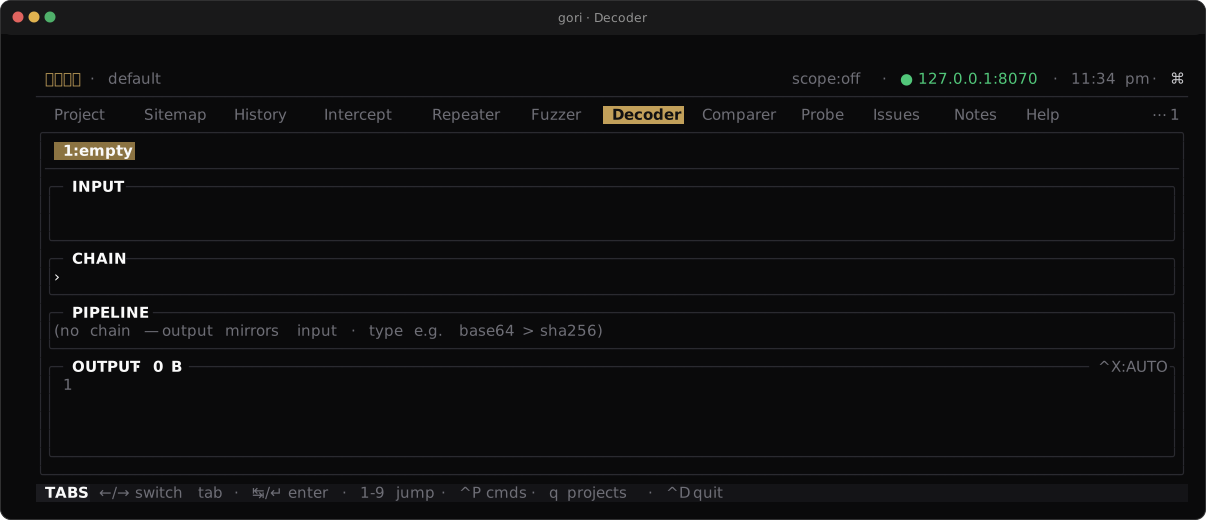
Layout
Four cards stack top to bottom:
| Pane | Role |
|---|---|
| INPUT | Source text (editable) |
| CHAIN | Pipeline spec: converter names separated by |, >, or , (all equivalent) |
| PIPELINE | One row per step with its intermediate output |
| OUTPUT | Final result (text / hex / base64 display modes) |
You can keep several conversions open as sub-tabs (new, rename, duplicate, close from the space menu). Open sub-tabs are saved with the project, so they come back the next time you open it and never follow you into another project.
Building a Chain
Type converter names on the CHAIN line. Steps run left to right:
url-decode | base64-decode | jwt-decode
hex-encode | upper
gzip-decompress | json-unescape
Aliases work the same as the primary name (b64 → base64-encode, url → url-encode, and so on). Autocomplete helps when the name is fuzzy.
Save a chain under a name (Ctrl-S, or Save chain by name from the palette) and reload it later. The save prompt starts from the sub-tab's own name, and saving under a name that already exists updates it. Load a saved chain (Ctrl-O) opens a picker over everything you've saved, showing each chain's spec next to its name, so you don't have to remember what you called it. Type to filter, and Ctrl-X deletes the highlighted entry from the library. Both keys work wherever you are in the tab: the sub-tab strip, the tab bar, or inside a pane.
Named chains live under the decoder section of settings and are shared by every project: the chain is a recipe, while what you run through it stays with the project. The Rewriter draws the same line differently: its rules are themselves global or project-scoped.
A saved name is also a converter: type it as a step and the whole saved spec runs in that position.
myenc > url-encode
That works everywhere gori accepts a chain, beyond this tab: the Ctrl-Q chain editor on a Repeater or Fuzzer §…§ marker, gori run decoder, and the MCP decode tool. Autocomplete lists saved names next to the built-in converters, and gori run decoder list shows them with the category saved.
Saved chains can call each other. A recursive definition fails that step with a message instead of hanging, and a name a built-in already answers to (including its aliases) is refused when you save it, because the built-in has to keep winning: letting the library shadow base64-decode would change what every spec in every project already means.
Converters
| Category | Examples |
|---|---|
| Encoding | base64-encode / base64-decode, base64url-encode, url-encode / url-decode, url-encode-all (every byte, WAF-bypass style), hex-encode / hex-decode, base32-encode / base32-decode, ascii85-encode / ascii85-decode, base58-encode / base58-decode, base36-encode / base36-decode, base62-encode / base62-decode, quoted-printable-encode / quoted-printable-decode, punycode-encode / punycode-decode (aliased idn-encode / idn-decode), nfc / nfd / nfkc / nfkd, rfc2047-q-encode / rfc2047-b-encode, rfc2047-q-decode / rfc2047-b-decode / rfc2047-decode, windows-bestfit-<codepage>, codepoint-overflow |
| Number bases | decimal-encode / decimal-decode, binary-encode / binary-decode, octal-encode / octal-decode |
| Compression | gzip-compress / gzip-decompress, zlib-compress / zlib-decompress, raw-deflate / raw-inflate (headerless, RFC 1951), brotli-decompress, zstd-decompress |
| Serialization | msgpack-decode, cbor-decode (a binary document as JSON text), and the native-serialization readers java-deserialize, dotnet-viewstate, php-unserialize, pickle-disasm |
| Token | jwt-decode (header + payload; signature shown, not verified), and the signed-session-cookie readers cookie-decode (auto-detects the framework), flask-decode (itsdangerous), django-decode (django.core.signing), rack-decode (Ruby) |
| Hash | md5, sha1, sha224, sha256, sha384, sha512, crc32 |
| Escape | html-escape / html-unescape, json-escape / json-unescape, unicode-escape / unicode-unescape, xml-escape / xml-unescape, c-string-escape / c-string-unescape, shell-escape, powershell-escape |
| Text | rot13, rot47, upper, lower, reverse, homoglyph, typo |
brotli-decompress and zstd-decompress are decompress-only, and that is the shape of the dependency rather than an omission: gori links the brotli decoder library and wraps libzstd's decompressor, because what a proxy needs is to read what an origin sent. Both accept the br and zstd aliases a Content-Encoding spells them with, and both tolerate a truncated stream, the ordinary case for a body copied out of a capture-capped flow. A gori built with -Dwithout_native_codecs still knows the names, and says that is the build it is rather than reporting a typo.
The four session-cookie readers decode the envelope and show what the cookie carries; they never verify a signature. Cracking the signing key, forging a cookie, and verifying one live are the Cookie workbench's job; this tab is the read-only half of it, reachable inside a chain.
msgpack-decode and cbor-decode read a binary document somebody else wrote and render it as JSON: one direction, and the one that matters. The JSON is a projection, not a re-encoding: what JSON has no room for comes back named rather than folded away ({"$bin": …} for a byte string, {"$tag": …} for a CBOR tag, {"$ext": …} for a MessagePack extension, a decimal string for an integer too wide for a JSON number). A document that runs out of input renders what it read and marks the spot with {"$partial": …}, which is the ordinary case for a body the capture cap cut short. One ambiguity comes with the projection: a document whose own map key is literally $bin or $tag renders the shape a wrapper does. Escaping every key in every body to defend against the one body that does this would make the common body harder to read.
The four native-serialization readers answer the question serialized_object used to leave hanging: gori flags a Java / ViewState / PHP blob in a cookie or a parameter, and these read it. java-deserialize walks the ObjectOutputStream grammar into {"$object": …} per instance with its declared fields and its writeObject annotation; dotnet-viewstate reads the ObjectStateFormatter token tree and says whether a MAC is present ("mac": false is the finding); php-unserialize demangles \0Class\0prop back to prop and keeps the visibility in $private / $protected; pickle-disasm disassembles (it never executes) and lists every callable the stream names under globals, with a reduce count beside it. All four are read-only: a back-reference comes back as {"$ref": n} rather than being expanded, and nothing is re-encoded (gadget-chain generation stays an out-of-tool ysoserial step). They take bytes, so base64-decode > java-deserialize is the shape a blob out of a cookie goes through. A converter is also more permissive than the detail pane's marker sniff, because typing the name is a decision the sniff never gets to make: pickle-disasm reads a protocol-0 pickle, which has no header and which the pane declines.
A few entries only go one way, and the chain will not undo them. shell-escape and powershell-escape wrap a value in a quoted literal. homoglyph swaps ASCII letters for Unicode lookalikes, and is partial: a letter with no established confusable is left alone. typo is a generator rather than a transform, emitting one near-miss variant per line, built from omissions, adjacent-character swaps, and QWERTY neighbour keys. The Unicode normalization steps are one-way: NFKC/NFKD expose compatibility folds such as fi → fi, ⁵ → 5, and fullwidth / → /. The visually similar U+2044 ⁄ FRACTION SLASH is not compatibility-normalized; the Windows Best-Fit tables map it to / on CP 1250, 1252, and 1254. RFC 2047 encoders emit UTF-8 Q or Base64 encoded-words, folding at the 75-octet limit; decoders accept UTF-8, US-ASCII, ISO-8859-1, and Windows-1252, join adjacent words before decoding the charset (so a character split across two words survives), and leave a malformed word as literal text. codepoint-overflow emits raw bytes (the character U+0140 → 0x40), so append hex-encode to inspect non-text results. windows-bestfit-<codepage> previews the bundled Microsoft Best-Fit mappings for CP 874, 932, 936, 949, 950 and 1250-1258. Characters absent from a page's table become its default ? character, one per UTF-16 code unit as WideCharToMultiByte counts them, so an emoji outside the BMP becomes ??. The tables are redistributed under Unicode License v3; source and license details are in src/gori/decoder/bestfit/README.md.
Ctrl-X cycles OUTPUT's display mode (text → hex → base64) for binary results. Copy with y in READ mode, Ctrl-Y while editing INPUT in INS, or use the space menu.
When to Use It
- Decode a JWT or nested Base64 blob from History without mutating the flow
- Build the same transform you'll apply as a Fuzzer payload processor
- Quickly hash or URL-encode values while writing Repeater requests
Decoder does not send network traffic; it's pure local transformation.
Next Steps
- Repeater & Fuzzer: payload processors use similar encode/hash steps
- Proxy & History: JWT / SAML / GraphQL / JSON-RPC (MCP) / LLM API calls are also decoded inline on captured flows
- Hotkeys: rebind Decoder-scoped actions