








A blind SSRF, a blind XXE, remote file inclusion, or an out-of-band injection: none of them answer you in the response. They reach out to some other server instead. OAST gives you that server: gori mints a payload URL tied to a listener, you plant it in a request, and any DNS or HTTP callback the target makes to it lands as a hit you can point to. This playbook runs one confirmation end to end in about ten minutes.
Before you begin. Set up an engagement first, and have a candidate injection point in hand: a parameter, header, or field that might make the server fetch a URL, include a remote file, or resolve a hostname. A callback reaches a public interaction server that sees its metadata, so only run OAST against systems you're authorized to test, and prefer a self-hosted provider for sensitive work.
1. Start a listener and grab a payload
Open the OAST tab (off the bar by default: press 0 and type "oast", or Ctrl-P → Go to OAST) and press Ctrl-R (or Space r, Start listening) to start listening; gori registers with the selected provider and begins polling. A new project has no provider yet: add one on the Providers sub-tab first (a; the public interactsh is prefilled). Then press g (get payload) to mint a payload, a unique hostname/URL that belongs to you for this session, and copy it. g starts the listener itself if you skipped Ctrl-R.
Headless, when you want the listener in a script or an agent loop:
gori run oast listen         # ad-hoc: the registration dies with the process
gori run oast listen --save  # …or keep it as a project session
A bare listen is store-free and its registration dies with the process, which for a callback that arrives hours later means the payload is already dead. --save writes it into the project instead: gori run oast list shows it, gori run oast resume ID picks it up in a later process, and gori run oast release ID is the teardown. Over MCP the same switch is oast_start with persist: true. The TUI's Ctrl-R has always saved one; resume it with Shift-R (Space R, Resume listener…).
Checkpoint. The OAST tab shows a live payload URL, and the Callbacks table is empty and waiting.
2. Plant the payload
Take that payload URL and put it where the target might dereference it. Send the candidate request to Repeater (Ctrl-R from History) or the Fuzzer (Shift-I), then Space O (Insert OAST payload) to drop the URL at the cursor. Plant it in whatever might trigger a server-side fetch or include: a URL parameter, a file/page/template field, a Host or X-Forwarded-For header, an XML entity for XXE, or a webhook field. Send the request.
Checkpoint. The request carrying your payload reached the target. A normal response is fine here; the point is what the server does next, out of band.
3. Watch for a callback
Back on the OAST tab, callbacks land in the Callbacks table as the target's infrastructure resolves the name or connects back, each with its protocol (dns / http / smtp), source IP, timestamp, and the sub-identifier that tells you which payload fired. Ctrl-X stops polling but keeps the registration, so a payload you already planted keeps resolving; press Shift-R to resume later and pick up whatever the provider buffered while you were away.
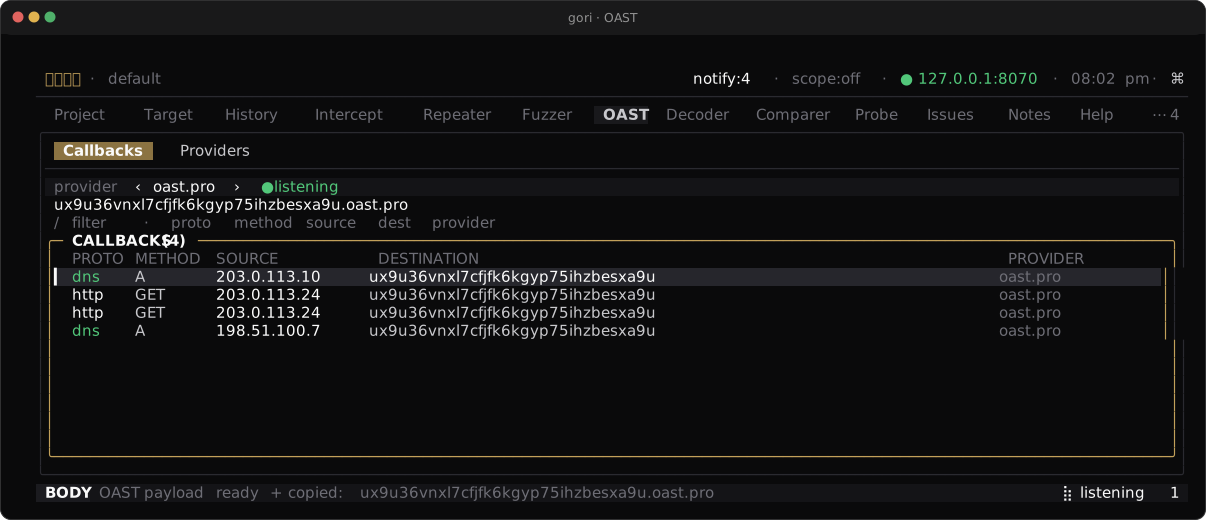
A callback is proof the target reached a server it had no reason to reach. The absence of one is not proof of safety (egress may be filtered), only that this path stayed quiet. Don't close a candidate on silence alone.
Checkpoint. At least one row sits in the Callbacks table, matching the payload you planted in step 2.
4. Turn a hit into an Issue
A callback is the strongest evidence this tool produces, so record it. Select the hit and press Shift-F (or Space → Add issue) to file it as an Issue, prefilled with its protocol and source and carrying the raw interaction as its notes. It opens at HIGH; Tab to the severity row and use ← / → to re-rate it before you commit.
Checkpoint. The confirmed callback is recorded as an Issue in the Issues tab, with the raw interaction in its notes.
Next Steps
- Triage and report: turn confirmed issues into a deliverable
- OAST: providers, resuming listeners, and self-hosting interactsh
- CLI Reference: every
gori run oastflag and the saved-provider verbs