








A predictable session cookie, CSRF token, or reset code is one an attacker can forge or guess. The Sequencer collects a few hundred of them and grades the real unpredictability each one carries. This playbook runs one grade end to end (point, collect, read, export) in about ten minutes, most of it spent waiting on the server to hand out samples.
Before you begin. Set up an engagement so the target is scoped. The Sequencer replays a live request many times: the sandbox and exclude rules stop every replay, and
gori run sequenceand the MCP tools refuse a target outside the scope unless you waive it (the TUI run, like the Repeater, has no such up-front check). Have a flow whose response sets the token you want to grade (aSet-Cookiefor a session or CSRF token). Only collect tokens from a target you're authorized to test; each sample is a real, freshly minted credential.
1. Point the Sequencer at a token
The Sequencer tab is off the bar by default. It's a workbench you reach for occasionally, not part of the daily loop: press 0 and type "seq", or Ctrl-P → Go to Sequencer.
Feed it from a captured flow: in History, select the flow whose response sets the token, then Space > s (Send flow to… → Send to Sequencer). A SEND TO SEQUENCER card opens over History with the likely session cookie auto-detected. If the guess is wrong, change the token kind there: pick one of Cookie, Header, Regex, Position, or JSONPath.
You don't need to trim the token's fixed skeleton (a sess_v1_ prefix, a version byte, padding) out of the extraction. gori finds the positions that never vary across the sample and runs the byte- and bit-level tests on the part that moves, so that structure neither drags the grade down nor counts as randomness (see Structure Is Not Secret).
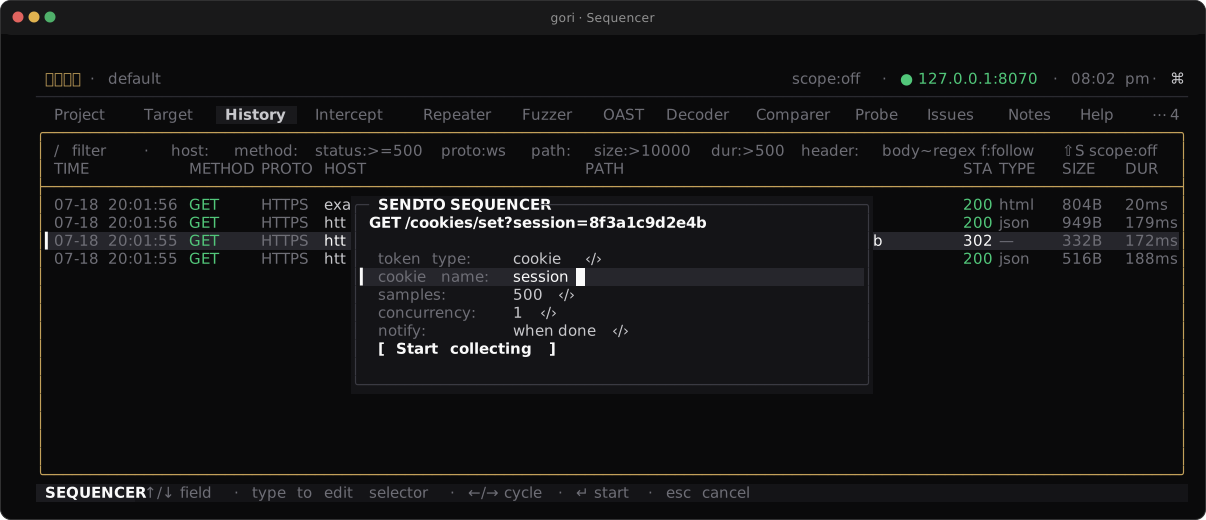
Checkpoint. The card names the token location you picked, with the sample goal and concurrency beside it.
2. Collect samples
Press Start on the card to collect; the run goes on in the background, and the Sequencer tab shows it (there, c reconfigures and Ctrl-R collects again). gori replays the source request over and over, pulling the token out of each response, until it reaches the target count. Ctrl-X stops early. Collection runs at concurrency 1 by default, because session tokens are often stateful (each request advances a server-side counter), and parallel replies can arrive out of issuance order. Raise it only when the endpoint is stateless.
Same collection, headless: replay flow 42, extract the SESSIONID cookie, gather 500 tokens:
gori run sequence 42 --cookie SESSIONID --count 500
Checkpoint. The SAMPLES count climbs toward your target as the replays land.
3. Read the grade
The ANALYSIS pane leads with effective entropy in bits (a conservative estimate of the real unpredictability per token) and a rating based on it: Secure (≥ 88 bits), Moderate (≥ 60), Weak (≥ 30), Critical (below 30), dropped one tier for every statistical test that fails. Under it sits the battery of statistical tests gori ran over the token bitstream (monobit, runs, chi-square, serial correlation, compression, and more).
Read it like this: a high entropy figure with every row passing means the token looks random to every test gori has; no shortcut to forge it turned up. Any duplicate or sequential token, though, drops the verdict straight to Critical however high the entropy reads, because a token you saw twice is a token you can predict. A small sample (under ~20 usable tokens) softens hard failures to warnings and caps the rating, so collect more before you trust a clean grade.
Checkpoint. The ANALYSIS pane shows one overall rating plus the per-test table behind it.
4. Export the verdict
The collected tokens are live credentials, so gori never writes them to disk; they vanish with the session. The verdict shouldn't. Press ⇧E to export a Markdown report to a path you choose (the palette offers the same report as JSON), or Space → a to file it as an Issue, which maps Critical to critical, Weak to high, Moderate to medium, and Secure to info. Neither carries a token value: the report is built from frequency tables and verdicts, so there's nothing in it to leak.
Checkpoint. You have a saved grade, report or Issue, and not a single raw token left behind.
Next Steps
- Confirm blind vulnerabilities with OAST: the next workbench, for bugs the response never shows
- Sequencer: the full reference for token locations, the test battery, and structure detection
- CLI Reference: every
gori run sequenceflag, including--tokensfor a pasted list