








gori's keyboard shortcuts are rebindable from the Hotkeys editor. Reach it from Preferences (Ctrl-, → Editor & Keys → Hotkeys, then ↵), or jump straight there with settings:hotkeys in the command palette (Ctrl-P). The editor lists every rebindable action grouped by where it fires (GLOBAL, HISTORY, REPEATER, FUZZER, INTERCEPT, …); pick a row, press a new key, done.
Ctrl-,  → Editor & Keys → Hotkeys
Ctrl-P  → settings:hotkeys
Key budget (how new shortcuts earn a key)
Bare letter keys are scarce. New actions should pick a price tier before taking a chord:
| Tier | Price | When | Examples |
|---|---|---|---|
| L0 Structural | Esc Enter Tab arrows Space (leader) |
Always | focus, open/close, READ/INS, space menu |
| L1 Loop | bare letter or sticky family (^R) |
many times / minute | History/Issues j/k / y t (mark), History v (view), sub-tab strip t (mark), Repeater send |
| L2 Session breath | Global bare (cap: c i s only) |
many times / session | capture, intercept, scope lens |
| L3 Contextual | Space then mnemonic |
occasional, pane-local | compare, mine, send-group, copy-as |
| L4 Rare / config | palette (Ctrl-P) or Preferences (Ctrl-,) |
rare | settings, Match & Replace, notifications |
Rules of thumb:
- Default for new pane actions is L3 (space menu only). Promote to a direct key only after the loop proves it.
- Ctrl is for actions that must work while typing (INS), and for run/stop on a workbench (
Ctrl-R/Ctrl-X). It is not a general upgrade from bare. - Shift carries the whole-tab wipes.
⇧XisClearin every tab that has one (History, Probe, Authorize, Issues, and the Project ACTIVITY feed), withXas the space-menu letter beside it. The letter isxand notcbecause of what sits under the shift: barexis bound in none of those five scopes, while barecis live in all of them (capture.toggle, anddismisson the Probe list), and a project wipe does not belong one shift above a key an operator presses all day. A destructive chord must also be named where it can be read before it is pressed (the Help sheet and the tab's own body hint, not the space menu alone), and it must ask first. ddestroys. Bareddeletes or dismisses the selected row in every scope that binds it (sixteen of them). The Repeater's response diff was the one exception, and it now sits on⇧Dso the reflex never lands on a display toggle. Its menu row isZd(Display… → Response diff); the first-leveldis Duplicate sub-tab, as on every sub-tab strip (see the space menu). A new pane action that is not a delete does not getd.- A pane's own key answers only in that pane. The Repeater's
p(pretty bodies) and⇧D(diff) act in the response pane, and the Fuzzer'sm(matched only) andv(distribution sidebar) in RESULTS. In the request and template panes the bare key does nothing: those lenses draw nothing there, and in the Fuzzer templatevis the menu's Clear selection. - Copy is the worked example of that rule.
ycopies in READ, andCtrl-Ycopies in INS as well, in every text box. In INS a bareyis a literal character, and typing it over aShift+arrows selection replaces the selection, so the copy reflex needs a chord that survives typing. Both are the same verb (*.copy), so a rebind moves the READ letter andCtrl-Ystays where it is: it is pinned, in every scope, including through an explicit unbind. Unbindingyis a statement about READ mode, and it must not quietly leave a text pane with no way at all to copy what you just selected. - Every list that holds something worth copying binds
y. A pane that shows bytes, a row, or a line of record and answers nothing toyis a gap, not a design: the Intercept queue, the Evidence archive, the Project ACTIVITY feed and the OAST callback detail each had one and each now answers the letter. Where two copies live in one place and mean opposite things (OAST's list copies the payload gori sent, its detail copies what came back), only one can hold the chord (a scope has no focus dimension in the keymap), and the other keeps its space-menu letter. /filters the list you are looking at. Every list long enough to scroll answers it, including the three rule lists that did not: Colormarker, Match & Replace and the Probe RULES sub-tab (~40 built-in rules across three sections). The bar is a lens: it hides rows and never disables one, andEscclears it. The one thing it changes is reordering: on the two lists where order decides which rule wins, a move is refused while a query is held, because a filtered list is not the order the rule engine holds.fhas two tiers and one exception. It is freeze in every evidence context (an Issue's RELATED card, the evidence viewer) and find on the sub-tab strip. The two are different tiers, so they cannot collide. History's follow and the Comparer's fold-unchanged areSpacemenu entries instead; both are session-rare toggles, which is what L3 is for. The exception is the Intercept queue, wherefforwards the held request and⇧Fforwards them all: that is the tab's own loop key and itsf/⇧Ffamily is internally coherent, so it is documented rather than moved, the same callCtrl-Rgets for History → Repeater.xselects a line;tflips a row's flag.xmeans "select this line" in fifteen scopes, and it was "enable/disable this rule" in four (Colormarker, Match & Replace, the Probe RULES list and the OAST providers). Those four now answert, which is whattalready means as mark in History, Issues, the Sitemap and the Intercept queue. A rule list has no marks, so nothing collides, and the Rewriter's toggle stops being a hand-rolled controller key and becomes an ordinary rebindable chord.sgoes to the source, or flips the scope lens. Those are its only two meanings. On the Evidence archive, an Issue's RELATED card, and the Probe list and detail,sopens the tab a row lives in. Everywhere else it is the Global scope lens. What it stopped meaning: swap A ⇄ B on the Comparer and the Diff (noww), and global ⇄ project on the Colormarker and Match & Replace rule lists (nowSpacemenu entries, so the lens is no longer shadowed there). One shadow is left and named: the Project ACTIVITY feed'sscycles the source chip, because that pane's/bar is a free-text query and does not parsesource:/level:/actor:to fold the three chips into.- The space menu is not an INS fallback: text editors swallow keys upstream, so
Spacestays a literal character there. An action that has to be reachable while typing needs a Ctrl chord, and a mnemonic alone is not enough. (This is whyCtrl-Q, not the space menu alone, carries the Repeater/Fuzzer decoder-chain editor after it gaveCtrl-Yup to Copy.) - History → Repeater and Repeater send stay on
Ctrl-R(same muscle memory). Do not move History→Repeater to barer. rsends to the Repeater;Ctrl-Rruns. Bareris "send this row to the Repeater" in the five scopes that have a flow to send, and nothing elsewhere: the Diff's Run moved toCtrl-R(which already owns Run in nine scopes), OAST's Resume listener moved toShift-R, and the Project ACTIVITY feed's Refresh is palette-only (Ctrl-P→ Refresh feed), since the feed already re-reads on entry, on a peer's write and on the poll. The sub-tab strip renames one, the menu's Rename letter, notr.- Match & Replace and Notifications ship keyless (palette / badge); rebind them if you want a Global chord.
One bare letter, one question
Bare letters are settled per question, not per tab. An action takes one of these only if it answers that letter's question; anything else starts at L3 (the space menu).
| Key | Means |
|---|---|
Enter |
show this row in place |
o |
open this row's own detail (Enter's alias; on the Sitemap Enter expands, so o is the only one) |
s |
go to the tab this row lives in, else the scope lens |
d |
delete / dismiss the selected row |
y |
copy |
t |
flip this row's flag (mark, or a rule's on/off) |
a |
add a row here |
e |
edit the selected row |
/ |
filter this list |
f |
freeze (evidence) · find (the sub-tab strip) |
r |
send this to the Repeater |
Ctrl-R |
run |
w |
swap A ⇄ B |
x |
select this line |
Shift-X |
clear this tab (asks first) |
Space |
this tab's command menu |
Three exceptions are deliberate, each a tab's own loop key: Intercept f forwards (and
Shift-F forwards all), History → Repeater and Repeater send stay on Ctrl-R, and the
Project ACTIVITY feed's s cycles the source chip.
Editing
The editor opens a working copy. Nothing is saved until you press Enter, and Esc discards every change.
| Key | Action |
|---|---|
↑ / ↓ (or j / k), wheel |
Move the selection |
/ |
Search the action list |
e or Space |
Rebind the selected action, then press the new key |
x or Backspace |
Unbind the selected action |
r |
Reset the selected action to its default |
Shift-R |
Reset every action to its defaults |
← / → |
Cycle the OS default profile (see below) |
Enter |
Save + apply (live, no restart) |
Esc |
Discard and close |
When you start a rebind the footer shows "press a key to bind". Press the chord you want, modifiers included, except the ones listed under Reserved keys below. If the key is reserved or already used by another action in the same place, the editor refuses it and tells you why; capture stays open so you can try another key.
A row's chord shows (unbound) when nothing is bound. The ● marker means you've changed it from the default; · means it's at the default.
Conflicts
Two actions may share a key only if they fire in different places. That's by design (s is "scope lens" almost everywhere but "go to source" on Probe, c is "toggle capture" globally, but the Intercept queue cycles the catch direction with it, and Probe dismisses, Cookie cracks, Evidence compares and the Sequencer reconfigures). The editor blocks only a same-place collision, because there the keymap could keep just one of them.
The Digit Family
The tab bar is nine numbered slots, and the numbers are the primary way to move:
| Key | Action |
|---|---|
1-9 |
Jump to slot N on the tab bar |
0 |
Go to tab…: a type-to-filter list of all 21 tabs, each with a line on what it is for |
⇧1-⇧9 |
Jump to sub-tab N of the active tab |
⇧0 |
Find sub-tab…: the same picker f opens from the strip |
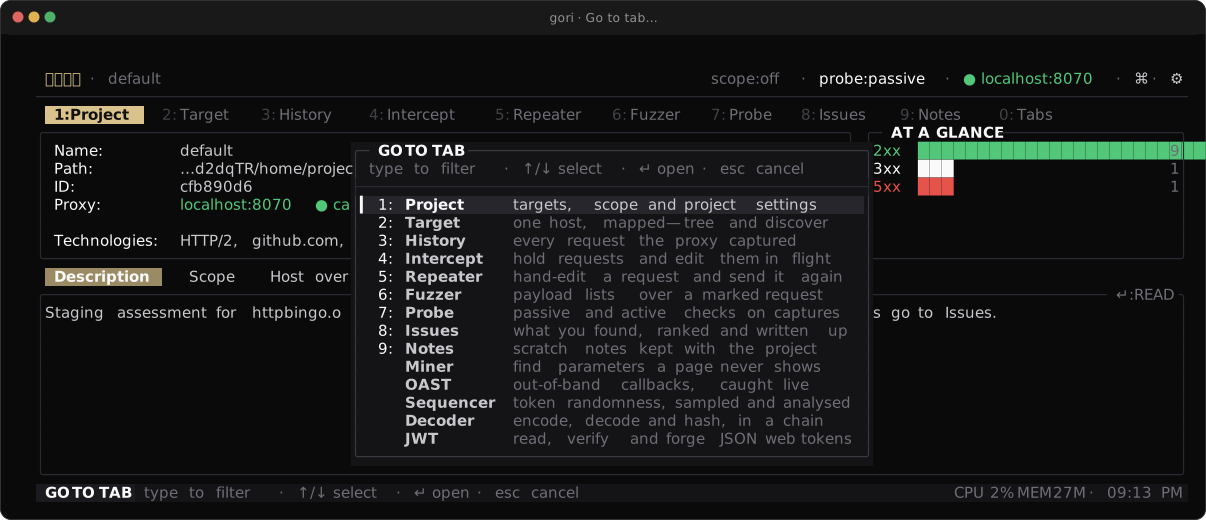
0 opens the whole catalog. The nine on the bar wear the digit that reaches them; the rest wear none. That is the only difference being off the bar makes.These work from everywhere (the tab bar, the sub-tab strip, a list body, a drill-in
detail, a read-only pane) with one exception: while a field is taking text (an editor in
INS, a / query bar or search, a line prompt, a picker's filter, the CVSS scorer, the
Decoder's CHAIN field), a digit is a character. It is the same rule Space follows: where
Space types a space, 3 types a 3, which is what makes base64, sha256 and rot13
typeable into a conversion chain.
The bar paints the numbers by default (Preferences → Layout → Tab numbers, settings:layout).
The pill just past the last tab reads 0:Tabs: the key, and what it opens. It sits two
columns after the ninth slot rather than pinned to the right edge, so the order → walks and
the order you read are the same one; only when the strip stops fitting beside it does it pin
right and let the tabs scroll. It is there whatever your layout is: 0 reaches the whole
catalog, the nine on the bar included, so there is nothing for it to count and no layout that
makes it disappear. The run to the right of it is left free on purpose, as a place for a readout
that is not a tab.
Nine slots, and the tenth tab
settings:tabs refuses a tenth tab and says so. Press ⇧K on a row below the seam instead:
that trades it onto the bar and the last slot off. A layout saved by an older
build (the bar used to be unbounded) is truncated to its first nine, in your own order,
and gori names the folded tabs once on the launch that does it.
One tab can still ride past the ninth slot: an off-bar tab you jumped to with 0 sits at the
far right of the bar, without a number, until you leave it. It is where you are standing,
not a slot you arranged, and no digit points at it.
If you want the old unbounded bar back, turn off Preferences → Layout → Tab bar slots.
The bar then scrolls with ‹ › again, 1-9 still reach its first nine tabs, and 0
still reaches every tab.
Keyboard layouts
A terminal speaking the kitty keyboard protocol reports ⇧3 as 3 plus a shift flag,
and gori binds that. Every other terminal sends the shifted digit as a character (# on
a US layout), which gori folds back onto ⇧3. On a non-US layout that character is a
different one, so ⇧1-⇧9 work where your terminal reports the shift modifier and not
otherwise. Both fallbacks are always live: f on the sub-tab strip opens the same picker
⇧0 does, and Ctrl-1…Ctrl-9 is the alias for ⇧1-⇧9 on terminals that deliver it.
The rest of the shifted punctuation row goes the other way. A character that only exists with
Shift (>, ?, {, }, ~, |, …) already says Shift was held, so gori drops the shift
flag a terminal reports beside it (kitty's report-all-keys, xterm's modifyOtherKeys). A bare
> opens Send flow to… and ? opens Help on those terminals too.
The space menu
Learning the menus? Space Menu & Palette walks through the space menu, its second cards and the palette's search, with a five-minute exercise. This section is the reference: the rules behind every letter and the full tables.
Space in a navigable pane opens the action menu for where you are standing: the
pane's own verbs, grouped under COMMON and the focused area's label, each fronted by one
mnemonic letter. It is not the palette: there is no typing and no filter, just one keypress
per row.
Moving inside the menu
↑/↓ or j/k move the selection, ←/→ or h/l change column, and ↵ runs the
highlighted row. No row is ever lettered h, j, k or l, at either level, so those four
always move, as they do on every list in the app, and a reflex j can never run an action.
gori refuses to start if a row breaks this. (The Send selection to… card, S, is a picker
rather than a menu level: it letters JWT j and Cookie k, and moves with the arrows.)
What moved when the rule came in: Link… and Manage links are L on every tab (they were
k or l), Add host to scope is H (was h), and the Activity feed's Filter by level
is v in the menu (its bare key is still l). The Discover tab's next and previous run and the
Fuzzer's Add List payload set moved too, and have since left the menu for the
palette.
Finding a tab's action by name
To find an action by name instead, type it into the palette (Ctrl-P). Once you type a query,
the palette searches the actions of the pane you opened it from as well as the app-wide
commands. It uses the same set Space would show there, plus the actions that have no menu
letter. The pane's matches come first under THIS TAB, then the app commands under APP.
Each tab row shows its fast path on the right: its key if it has one, else its menu letter
(␣ t means Space, then t; ␣ > c is a row inside Send flow to…). If you have rows marked, the title reads
COMMANDS · 3 MARKED, just like the space menu, so you know a batch action acts on all of
them. With the query empty, the palette lists only the app commands, as it always has.
Opened over a History flow detail, the palette searches the detail's actions. Esc from the
palette returns you to that detail, and an action you pick runs against the flow on screen.
Actions only the palette lists
The space menu is for what you press often; the palette is for the long tail. An action that
only repeats a key you already have, for an editing or navigation convenience, or that you use
about once a session to configure something, has no menu row. Type its name into Ctrl-P from
the tab it belongs to and it is listed under THIS TAB. Its key, where it has one, works
exactly as before, and Help names the route: the key, or ^P → <name> for an action with none.
| Tab | Action | Key |
|---|---|---|
| Repeater | Mark word · Edit decoder chain · Pretty-print request | Ctrl-K · Ctrl-Q · Ctrl-U |
| Repeater | Minimize request · Use as refresh for slot… · GraphQL: insert introspection query · GraphQL: insert legacy introspection query | palette |
| Fuzzer | Mark word · Edit decoder chain · Pretty-print template | Ctrl-K · Ctrl-Q · Ctrl-U |
| Fuzzer | Add List payload set · Save results | Ctrl-L · ⇧E |
| Fuzzer | Run history | palette |
| History | gRPC: reflect schema | palette |
| JWT · Cookie | Toggle decode/encode (decode/forge) · Cycle signing alg (format) | Ctrl-T · Ctrl-A |
| Comparer | Next change · Previous change | ⇧N · ⇧P |
| Decoder | Save chain by name · Load a saved chain · Cycle output mode | Ctrl-S · Ctrl-O · Ctrl-X |
| Issue detail | Edit title/severity · Retest… | t · ⇧R |
| Issue detail | Raise severity · Lower severity | palette (Set severity keeps Space s) |
| Rewriter · Colormarker | Move up · Move down | ⇧K · ⇧J |
| Rewriter · Colormarker | Reload rules | palette |
| Discover | Previous run · Next run | palette |
| Sequencer | Export report (JSON)… | palette (Export report keeps Space E) |
| Project | Refresh feed (ACTIVITY) · Change prefix (ENV) | palette |
| Notes | Go to line | palette |
One menu per tab, whatever has focus
Nine tabs carry a sub-tab strip: Repeater, Fuzzer, Miner, Sequencer, Decoder, JWT,
Cookie, Comparer and Notes. The strip's own actions used to be a context section like any
other: they appeared only while the strip had focus, so from a body pane you had to walk
focus up a level before Space would even offer "close this sub-tab".
They are now their own SUB-TABS bucket, and it is in the menu from every level of a tab
that has a strip: the body panes, the strip itself and the tab bar. With ⇧1-⇧9 dropping
you anywhere, what Space offers must not depend on which row the cursor happens to be on.
In a body pane the bucket is one row, T Sub-tabs…, which opens a card with the whole
bucket on the letters below, so it no longer fills half the card: Space T w closes the
sub-tab from the request editor. With the strip or the tab bar focused, the strip is the
context, so the bucket is drawn in full at the top level and there is no Sub-tabs… row. The
letters are the same either way: n from the strip is T n from a pane. Paste cURL
(U, Repeater) also keeps its own row in the panes, and Ctrl-N / Ctrl-W work everywhere.
The same nine letters on all nine strips
The bucket is one table to learn, not nine. A tab that does not have an action simply omits the row; it never spends that letter on something else.
| Key | Action | Direct chord |
|---|---|---|
n |
New sub-tab | Ctrl-N |
w |
Close sub-tab (or every marked one) | Ctrl-W |
d |
Duplicate sub-tab | |
e |
Rename sub-tab | e on the strip |
t |
Mark or unmark the active sub-tab | t on the strip |
f |
Search sub-tabs (the ⌕ picker) |
f on the strip, ⇧0 anywhere |
/ |
Filter the strip (name / host / method / tag) | / on the strip |
T |
Mark every sub-tab the filter shows | ⇧T on the strip |
N |
Clear the sub-tab marks | Esc on the strip |
g |
Tag sub-tab (Repeater) |
Ctrl-N and Ctrl-W are shown beside their rows, and they work from any pane on all nine
tabs. The menu teaches the faster key rather than hiding it. (Miner and Sequencer seed
their sessions from a run, so they have no n.)
T used to mark every sub-tab from a pane; it is T T now, so the old reflex lands in the
right card. The menu's t is the strip's own t, marking the sub-tab you are on, so the
Repeater's Tag moved to g, a letter no strip key answers.
The nine letters are reserved in the COMMON rows of those tabs, which share the card with
the expanded bucket on the strip, and gori refuses to start if a COMMON row breaks it. A pane's
own rows no longer compete with them, since from a pane the bucket is one level down; only T,
the Sub-tabs… row, stays taken there. Earlier, while every pane still drew the whole bucket, pane
actions gave the nine up: Mark word in the Repeater/Fuzzer editors and the JWT and Cookie lens
toggles (now palette-only on Ctrl-K and Ctrl-T), JWT and Cookie's copy
OUTPUT (C) and Notes' $EDITOR (o). They keep those letters for now.
One intent, one letter
An action that recurs across tabs has the same menu letter on every tab that has it. The
letter comes from one table in the source (Verb::Lexicon), not from each row, so two tabs
cannot drift apart on it:
| Key | Action |
|---|---|
/ |
Filter this list |
d |
Delete or dismiss the selected row |
x · v |
Select the line · clear the selection |
y · Y · S |
Copy · Copy as… · Send selection to… |
t · T · N |
Mark · mark all · clear marks (on a rule list, t enables/disables) |
o |
Open the selected row (the ↵ alias) |
a · e |
Add · edit; on most tabs a also files an issue |
r · s |
Run, send or reload (the menu echo of Ctrl-R) · stop, swap A ⇄ B, the scope lens, set an issue's severity |
E |
Export |
K |
Clear the workbench input (asks first) |
I |
Insert a § marker |
C |
Clear every § marker · set an issue's status · duplicate a rule |
L · H |
Link… (attach to an issue or note, or manage links) · add the host to scope |
O · M · V |
Insert (or, in History, copy) an OAST payload · mock this response · set an issue's CVSS |
X |
Wipe the tab (asks first), and nothing else |
/ d x y Y S t T N and X are reserved: on a tab that has the action, no
other row wears the letter. The rest are the action's wherever it exists and free for a tab-local row where it
does not. Rewriter and Colormarker's Enable/disable everywhere is T for this reason: X
wipes.
No row is c or i on a tab that does not bind the letter itself. There a press that loses its
Space reaches the global keys, and those two stop capture and hold all traffic. That is why
status, rule duplicates and marker clears are C, and Diff's Add issue is F, its own ⇧F.
Send flow to…
Handing the selected flow to another tool is one row, > Send flow to…, which opens a
second card. Inside it every tool has the same letter on every tab:
| Key | Sends the flow to |
|---|---|
r |
Repeater |
f |
Fuzzer |
c |
Comparer |
m |
Miner (the Params tab's Mine parameters too) |
s |
Sequencer |
a |
Authorize |
D |
Discover |
b |
the browser (Open response in browser) |
So Space > c sends to the Comparer from History, the Sitemap, a Repeater tab or a Fuzzer
result alike. A tab lists only the tools it can send to. The letters match the
Send selection to… card (S): Sequencer is s in both, and Decoder keeps the d it
already had there, which is why Discover is D.
>on its own opens the card too, on every tab that has it:>fsends to the Fuzzer without theSpace, and a droppedSpacestill lands in the same card. No tab binds>to anything else.- Send to Repeater keeps its own letter too:
ron History, the detail, the Sitemap, Probe, Evidence and an issue,Ron the Fuzzer and the Miner, whererruns the tab. - The
>row is drawn whenever the tab has a send, even when nothing is selected. The card then says nothing here right now, soSpace>rtyped quickly never reaches the pane underneath. EscorBackspacegoes back one level, andEscagain closes. Any other key closes the whole menu, as at the first level.- The title reads
SPACE › SEND FLOW TO, with· 3 MARKEDwhen rows are marked. - Direct keys are unchanged:
Ctrl-R/rto the Repeater and⇧Ito the Fuzzer still work.
What moved: on History these were c z m q u d ⇧B, and Delete took d, its own
bare key, now that Discover left it. The detail's Delete is d too.
Display… and Protocol…
The toggles are two more cards. Z Display… holds what changes how a pane draws what it
holds, and P Protocol… holds what changes what a Repeater or Fuzzer request sends. An
action that rewrites the request itself, such as pretty-print request (Ctrl-U), is not a toggle
and stays out of both cards.
| Display… | Protocol… | ||
|---|---|---|---|
x |
Hex (History detail, both Repeater panes) | 2 |
HTTP/2 |
p · u · b |
Pretty · Unicode escapes · whitespace | s |
SNI override |
d · e |
Response diff · envelope/decoded | c |
Auto Content-Length |
s · f · c |
Static assets · follow · Columns… | w |
Reuse Sec-WebSocket-Key |
g · q · J |
Fold ids · fold queries · JS references | r · f |
gRPC reframe · gRPC field editor |
m · v · G |
Fuzzer: matched only · distribution · group by shape | t |
TLS fingerprint |
t · z |
Comparer: requests/responses · fold unchanged | ||
a |
Show all: Probe's closed issues, the Params tab's standard headers |
Both cards are sticky. After a row runs, the card comes back at the same row, so you can
flip two or three settings in one visit, and each row shows its state: ● on, ○ off, or a
value such as the TLS preset's name. Esc closes the card. It does not come back when a row
opened something of its own, such as the SNI field, the gRPC field list, the request hex editor
or the column editor, or when the row moved focus.
⇧Zand⇧Pon their own open the cards too, like>:Zcwithout theSpacestill reaches Columns…, rather than a barecthat stops capture.- Display… is
Z, notV: under thevimkeyset⇧Vselects a line in every pane that has these toggles, so a droppedSpacewould select instead of opening the card. - The Fuzzer's Cycle sort stays a direct row (
Spaceo), because it is the one you press most while reading results. - Direct keys are unchanged:
Ctrl-Xhex (in the Repeater, the pane that has focus: the request's hex edit or the response's hex dump, and both rows show it),ppretty,uUnicode,bwhitespace,⇧Ddiff,Ctrl-Tenvelope,ashow all,Ctrl-VHTTP/2,Ctrl-SSNI,Ctrl-Lauto Content-Length.
What moved: hex was e in the History detail, x in the Repeater request pane and h in its
response pane, and is now Z x in all three. Probe's Show closed and the Params tab's
All headers were Space a and are Z a, and Mine parameters on Params was Space m and
is > m; their bare a and m still work. Save results on the Fuzzer gave up P (it is
⇧E, the Export chord, and palette-only). The History detail's Copy flow row is gone: Space Y (Copy as…)
on the REQUEST pane has Raw request, the same text.
Editor Keysets
gori's text panes are modal: Esc and i move between READ and INSERT, and in READ the bare letters are commands. The shipped grammar is helix-shaped: select first, then act. x selects the line, then y copies it or d deletes it, and p pastes. vim spells the same edits yy, dd and p, or V then y / d, and that difference is what a vim-trained hand fights all day.
Preferences → Editor & Keys → Keys → Editor keyset (Ctrl-,), or settings:keys in the palette, switches it. Typing vim, helix or keyset into the palette (Ctrl-P) finds that row too. The first-run wizard (gori wizard) does not ask; its Review step shows the keyset in use and points here. The Keyset playground row under Editor keyset opens a three-line practice pad that answers in the keyset you are trying, so you can try x d against dd before choosing, with every READ-mode key of that keyset listed beneath it; ↑/↓ switch keysets and ⇥, ↵ or any letter moves into the pad. It only tries: pick your keyset on the Editor keyset row above it. The pad's copies stay in gori's paste register and never reach your clipboard, and the playground puts the register back as it was when it closes.
| Keyset | Select line | Delete line | Copy line | Paste | Undo | Find | Append | Top / bottom |
|---|---|---|---|---|---|---|---|---|
| helix-ish (default) | x |
x then d |
x then y |
p |
Ctrl-Z |
Ctrl-F |
— | — |
| vim-ish | ⇧V |
dd |
yy |
p |
u |
/ |
a |
g / ⇧G |
Everything not in that table is the same under both keysets, because gori already spells it the way vim does: i enters INSERT, Esc leaves it, Ctrl-G goes to a line, and arrows plus Shift extend a selection. In READ, h j k l move the caret in every text pane as the arrows do, and ⌥← / ⌥→ (Ctrl on Linux and Windows) step a word. The delete and copy keys act on any selection too, not only on a line: under vim-ish, ⇧V then d or y works as it does in vim.
A line selection stays whole lines while it grows: ⇧↑ / ⇧↓ add a line at a time under both keysets, and under vim-ish a plain j / k does too, so ⇧V j j d deletes three lines. A sideways step turns it into an ordinary character selection. Esc over any READ selection clears it, under both keysets; the next Esc leaves the pane as before.
vim-ish also steps a word with w / b in READ, and ⇧A / ⇧I start typing at the end / start of the caret's line.
Delete and paste in READ
These work in every text editor pane: the Repeater request, the Fuzzer template, the Intercept editor, Notes, an issue's notes, the Project description, and the Decoder, JWT and Cookie inputs.
- Delete (
dafter a selection,ddundervim-ish) removes the text and keeps it forp. A whole-line selection is removed with its line break, so no blank line is left behind. - Paste (
p) puts back the last thing you copied or deleted, after the caret. Whole lines go in as new lines below the caret's line; anything else is inserted inside the line. - gori keeps what
ppastes in its own paste register, filled by every gori copy (yand the copy pickers) and by every delete. It does not read the system clipboard: terminals refuse to hand it back, or ask first. To bring in text from another program, paste it with your terminal as before; that opens INSERT on its own. A delete does not overwrite the system clipboard. - An edit made in READ is an ordinary edit, and the pane treats it as if you had typed it: the Repeater keeps
Content-Lengthin step, the Fuzzer still guards its§markers, and an issue's notes are saved asEscsaves them.Ctrl-Z(uundervim-ish) takes a delete back in one step, and a paste the way a terminal paste in that pane undoes: in one step, except in the Project description and an issue's notes, which take a paste key by key and undo it line by line. - With nothing selected,
dunderhelix-ishsays so instead of deleting. Undervim-ishthe firstdorywaits for the second; any other key cancels it, andEsccancels it without a message. With nothing selected,yundervim-ishwaits foryyrather than copying the whole pane, so useCtrl-Yfor that. - Read-only panes keep their own letters:
pis still Pretty bodies in the Repeater response and the History detail.
A keyset is a mapping, not an emulation
It is a named bundle of key overrides for a small, fixed set of editor actions: the same mechanism as the OS default profiles, one layer up. It does not add motions after an operator, counts, text objects, named registers, or any editing operation gori's panes do not already have. A READ-mode pane is a caret, a selection, a copy, a delete and a paste; naming keys for operations that do not exist is how "vim mode" becomes a promise the editor breaks.
So some vim spellings are deliberately not offered, each for a reason you can check:
ggand every other two-key sequence exceptddandyy. A gori chord is one keystroke.ddandyyare the exception: their first press waits for the second.galone is the top of the pane.dandytake no motion, sodw,djandd2dare cancelled rather than guessed at.$and0.$arrives as⇧4, which jumps to the fourth sub-tab, and0opens Go to tab; an editor binding either would take that key away inside text panes.EndandHomereach the line edges under both keysets.:commands, including:42. A bare:is reserved for gori's own command line, so go-to-line staysCtrl-Gunder both keysets.x,D,P,o,Jand the rest of vim's editing keys. Delete and paste are the READ-mode edits gori has; everything else happens in INSERT.- A rule list's enable/disable (Colormarker, Probe rules, OAST providers, Rewriter), which is
ton all four. It turns a rule on and off; it is not a selection, so no keyset moves it. - The Intercept queue's select-line, which ships keyless on purpose. That pane reaches it from the space menu, and a keyset only respells existing keys; it does not give a key to a pane that was designed without one.
The override order
Four layers, most specific first:
your own rebinding > the keyset > the OS default profile > the shipped chord
A keyset is therefore a better default, never a ceiling: pick vim-ish and then rebind one action in the Hotkeys editor, and that one stays where you put it. "Reset to default" on a row puts it back to the active keyset's spelling, not to the shipped one.
Every surface follows the active keyset with no extra step, because they all read the effective keymap: the status hint strips, the Help tab, the command palette, the space menu and the Hotkeys editor's own conflict messages. Under vim-ish the Notes footer reads / find where it read ^F find, and binding something to ⇧V is refused by name because Select line is there.
It does not touch the space menu's letters
A keyset moves the key you press in the pane, not the letter the space menu puts in front of a row. Any per-action rebind follows the same rule, which is why those letters are stable identities. Under vim-ish the menu still fronts Select line with x, and prints the live chord beside it:
│ x Select line ⇧V │
so the card teaches both halves rather than making you guess which one it means. The nine SUB-TABS letters (n w d e t f / T N, inside Sub-tabs… from a pane) likewise mean the same thing on all nine strips whichever keyset you pick. The two namespaces cannot collide: the menu is modal, and a keyset only ever writes to the keymap.
That includes /, which is a SUB-TABS letter and vim-ish's find key. They are different tiers: the menu letter acts on the strip while the card is up, and the chord searches the text pane you are standing in. The one deliberate pane-key overlap is u in the Repeater's read-only response: it toggles display-only JSON Unicode decoding. The request editor is still in the Editor scope, where u means undo. validate_chords! checks same-scope collisions at boot; the cross-scope exception is pinned in spec/verb/keyset_spec.cr.
A few menu letters are also a vim-ish motion in an editor pane: Auto-mark a (append), g on the Repeater, Cookie and issue detail (top), Send race ⇧G (bottom), Set CVSS V (select line), and Insert marker ⇧I and Probe active ⇧A (start typing at a line edge). If the Space before one of them is lost, the key does what vim would, which moves, selects or starts typing, and never sends, writes or deletes. The editing letters are the other deliberate overlap, under both keysets: inside a text editor d, y and p are the editor's, so a lost Space before the menu's d (Delete issue in an issue's notes) or y (Copy) edits or copies the text in that pane, says so, and can be undone. A menu letter that lands on anything else in the pane is refused.
What still works whatever you pick
Ctrl-Z keeps undoing inside INSERT under vim-ish: that guard runs before the keymap in every text editor, which is where a typing hand wants it. Ctrl-F likewise still opens the find prompt, INSERT included; / is an addition in READ, not a replacement. And i is refused with a message on a read-only pane that sits beside an editor (the Repeater response, the Fuzzer results, the Decoder output), under both keysets.
Reserved Keys
Some keys can't be rebound because the terminal or gori needs them:
-
Quit:
Ctrl-C,Ctrl-D. -
Indistinguishable from named keys:
Ctrl-M/Ctrl-J(Enter),Ctrl-I(Tab),Ctrl-H(Backspace),Ctrl-[(Escape). -
Structural:
Enter,Esc,Tab,Backspace,Space(the space-menu leader), and a bare:(the command line). -
gori shortcuts claimed before the keymap:
Ctrl-G(go to line),Ctrl-F(find, thenTabfor find & replace),Ctrl-B(reveal whitespace),Ctrl-E(external editor),Ctrl-P(command palette),Ctrl-N(new repeater/fuzz/note),Ctrl-W(close the sub-tab, or every marked one),Ctrl-Z(undo, consumed by every text editor: Repeater, Fuzzer, Notes, Issues, Intercept, Decoder, JWT, Cookie, Rewriter and the Project description),Ctrl-,(Preferences), andCtrl-1…Ctrl-9(switch sub-tab, the alias for⇧1-⇧9; see The digit family). These are handled by a hardcoded guard before the keymap, so a binding on them would never fire. For the same reason Command palette, Reveal whitespace, Quit, Back to projects, each tab's New … (Repeater, Fuzzer, Decoder, JWT, Cookie, Notes, Comparer) and its close-sub-tab action aren't listed in the editor. Their key is fixed.You can't move an individual key out of that family, but you can give the whole family a second modifier; see Command modifier below.
Ctrl-G/Ctrl-Fact on whichever multi-line pane has focus: the Repeater's request and response, the History detail, the Intercept editor, Notes, the Project description, the Decoder's INPUT and OUTPUT, and the Fuzzer's template and result detail.Tabswitches find to find & replace on the six that are editable; everything else is read-only, and the prompt says so rather than offering a swap it cannot make.
Flow-control/signal chords like Ctrl-S are not reserved; gori runs the terminal in raw mode, so they reach the app (Repeater's SNI toggle ships on Ctrl-S).
OS Default Profiles
The ← / → profile selector picks which default key set a fresh (un-overridden) binding uses: auto (tracks the platform gori was built for), macOS, Linux, or Windows. Your own rebindings always sit on top of the chosen profile, regardless of OS.
Today the per-OS defaults are identical: in a terminal, Ctrl+letter chords reach the application on macOS, Linux, and Windows alike, and the genuinely hazardous keys are the reserved control characters above (blocked everywhere). The profile mechanism is in place so a real per-terminal clash can be fixed without touching dispatch. For now, auto is the right choice for everyone.
Command Modifier
The chord family listed under Reserved keys is fixed because a hardcoded guard runs before the keymap. That's a problem when your terminal never delivers the Ctrl form at all:
Ctrl-1…Ctrl-9is undeliverable on many terminals: there is no control character for it, so the sub-tab jumps simply never arrive. You never need it:⇧1-⇧9is the primary sub-tab jump (see The digit family), and on a sub-tab stripflists and searches every open sub-tab, from whichever chip you are standing on. (The⌕at the strip's left edge opens the same list; click it, or press←from the first chip.)- A multiplexer eats the chord first. tmux's default prefix is
Ctrl-B, which gori also uses for reveal-whitespace.
Preferences → Editor & Keys → Keys → Command modifier (Ctrl-,), or settings:keys in the palette, switches that family between Ctrl and Option (⌥). It is an alias, not a swap: with Option selected, ⌥P opens the palette and ^P still does. Only the advertised form changes: status hints, the Help tab and the palette all start showing ⌥P, ⌥N, ⌥1-9.
| Modifier | Effect |
|---|---|
Ctrl (default) |
^P ^N ^W ^G ^F ^B ^E ^Z ^, ^1-^9 |
Option (⌥) |
the above plus ⌥P ⌥N ⌥W ⌥G ⌥F ⌥B ⌥E ⌥Z ⌥, ⌥1-⌥9 |
Because Ctrl keeps working, picking Option can never lock you out of the palette. That is worth knowing before you flip it, since on macOS your terminal must be set to send Option as Meta/Esc+ or ⌥P arrives as π and nothing happens:
- Terminal.app: Settings → Profiles → Keyboard → Use Option as Meta key
- iTerm2: Settings → Profiles → Keys → Left/Right Option key → Esc+
Two things it does not do. It doesn't touch chords the editor can already rebind (^R send, ^S SNI, …); rebind those per action instead. And if you had bound an action to an Option chord in the family (alt-n, say), turning the alias on shadows it: the guard wins, that action reverts to its default, and the save toast names it.
The first-run wizard recaps this on its Review step, so you can pick a modifier before ever reaching the app.
Where It's Stored
Saved to ~/.gori/settings.json (override the directory with $GORI_HOME) under a sparse hotkeys block. Only the bindings you changed are written, as a list of chord labels per action id; an empty list is an explicit unbind:
{
  "hotkeys": {
    "os": "auto",
    "command_modifier": "alt",
    "keyset": "vim",
    "bindings": {
      "rules.edit": ["g"],
      "scope.edit": []
    }
  }
}
command_modifier is "ctrl" (the default) or "alt", and keyset is "helix" (the default) or "vim"; see Editor keysets. An unknown value for either falls back to the default rather than to no keys. An untouched install writes no hotkeys block at all.
An absent action uses the profile default. Unknown ids and unparseable chords are ignored on load, so hand-edits and version drift degrade gracefully.
Limitations
- Only an action's primary chord is shown/edited; navigation aliases (e.g. the arrow-key duplicates of
j/k) aren't listed. - Every surface that names a rebindable chord reads it from the effective keymap: the command palette, the space menu, the Help tab and its popup, the status-bar hint strips, and the empty-state cards. What stays literal is not a verb: the claimed
^P/^N/^W/^1-9family (the sub-tab alias) and structural keys (esc,↵, arrows,↹). - Space-menu mnemonic letters are stable action identities (Helix-like); rebinding changes the direct chord, not the space-menu letter.
- Where the sub-tab strip binds a letter for an action, the menu spells that action with the same letter:
tmarks the sub-tab,flists and searches the sub-tabs,⇧Tmarks the whole strip, anderenames. Rename used to beron the strip, butrisRun/Send(the menu echo ofCtrl-R) in the Repeater, Fuzzer, Miner and Sequencer, so the strip moved to the menu'serather than the other way round;ron the strip now does nothing. See the space menu for the whole table. - The editor actions are rebindable individually, and as a set via Editor keysets. What the rebind editor will not move is the handful whose chord a hardcoded guard answers first:
Esc(back to READ),Ctrl-Z,Ctrl-FandCtrl-G. They are listed in the Help sheet so you can read them, and a keyset can give them a second, bare spelling, which is howvim-ishreachesuand/. - Press
?from a navigable context to jump to the Help tab (mitmproxy-style cheat-sheet).
Next Steps
- Settings: the Preferences modal and every section in it
- Themes: switch or create colour themes the same way
- Configuration Reference: the
hotkeyskey insettings.json