








The Decoder runs a value through a chain of converters (base64, URL, JWT, a hash, compression) one step at a time, showing the output of each. This playbook builds a chain, reads where it succeeds or garbles, and saves it under a name so the next value runs through it in one keystroke. It takes a few minutes and sends no traffic: the whole workbench is local transformation, so nothing here needs a target, a scope, or an authorized host.
Before you begin. Have gori running (the Quick Start gets you there). No capture, project scope, or network target is required; the Decoder never leaves your machine, so there is no host to authorize.
1. Open the Decoder and paste input
Open the Decoder tab (off the bar by default: press 0 and type "decoder", or Ctrl-P → Go to Decoder). Four cards stack top to bottom: INPUT (the source text), CHAIN (the converter spec), PIPELINE (one row per step), and OUTPUT (the final result). Put the cursor in INPUT and paste the value you want to work on: a cookie, a token, a Base64 blob lifted from a captured flow.
Each open conversion is a sub-tab, and sub-tabs are saved with the project, so a scratch pad you leave open comes back the next time you open that project and never follows you into another.
Checkpoint. Your pasted value sits in the INPUT pane.
2. Build a chain
Type converter names on the CHAIN line, separated by |, >, or , (all equivalent). Steps run left to right, and each one's output feeds the next:
base64-decode | jwt-decode
Add a step to hash or re-encode the result: sha256, url-encode, hex-encode. Aliases resolve to the primary name (b64 → base64-encode), and autocomplete fills in a fuzzy name. The full set spans encodings (Unicode normalization included), number bases, compression, deserializers (MessagePack, CBOR, Java, PHP, pickle…), jwt-decode and session-cookie decoders, hashes (md5 … sha512, crc32), and escape/text transforms; gori run decoder list (or the Decoder guide) prints every one with its category and direction.
The same chain runs headless, taking its value from the argument or stdin:
gori run decoder 'base64-decode | jwt-decode' "$TOKEN"
echo -n secret | gori run decoder 'sha256 | base64'
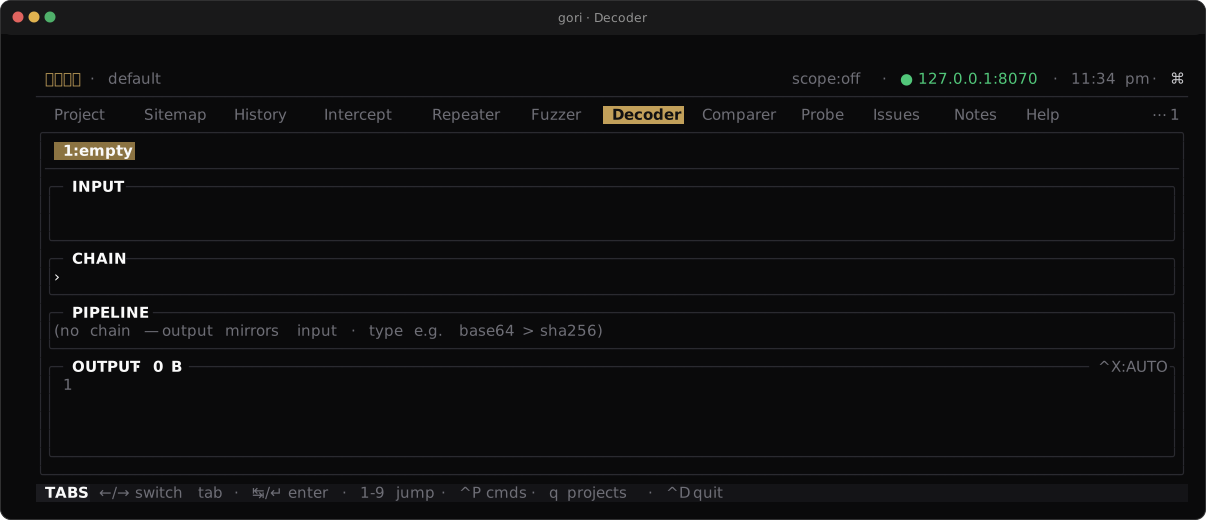
Checkpoint. The PIPELINE lists each converter on its own row with the intermediate output it produced.
3. Read the pipeline and final output
The PIPELINE is where you debug the chain. Read it top to bottom: each row is one step's output, and the last row feeds OUTPUT. When a step receives input it can't handle (base64-decode on text that isn't Base64, jwt-decode on something that isn't a token), that row is where readable data turns to garbage or an error, and every row below it is downstream noise. Fix the step or reorder the chain and read again.
For binary results, Ctrl-X cycles OUTPUT's display mode (text → hex → base64), so bytes that look empty as text are legible as hex. Copy the final value with y in READ mode, or Ctrl-Y while editing INPUT in INS.
Checkpoint. You can point at the exact PIPELINE row where the output first goes wrong, or confirm every row is clean and OUTPUT holds what you expected.
4. Save and reuse a named chain
A chain you'll use again is worth a name. Save it with Ctrl-S (or the palette's Save chain by name); saving under an existing name updates it. Load one later with Ctrl-O, which opens a picker over everything you've saved, each name shown next to its spec, where you type to filter and Ctrl-X deletes the highlighted entry.
Named chains live under the decoder section of settings and are shared by every project: the chain is a recipe, while whatever you run through it stays with the project. A saved name is also a converter: type it as a step and its whole spec runs in that position, whether in the Decoder, on a Repeater or Fuzzer §…§ marker, in gori run decoder, or through the MCP decode tool, which runs the identical chain over an argument.
Checkpoint. A saved chain re-runs on new input from every surface: the load picker, the CLI, and as a step inside another chain.
Next Steps
- Attack a JWT: go past
jwt-decodeto edit a token's claims and re-sign it - Decoder: the full converter table, sub-tabs, and the saved-chain rules
- CLI Reference: every
gori run decoderoption