








You have a captured request with a parameter worth pushing on. This playbook marks one value in it, throws a payload set at that single spot, and reads the responses for the one that behaves differently: the whole Intruder-style loop, in the TUI and headless. Budget about ten minutes.
Before you begin. Set up an engagement first, so your target is scoped; the Fuzzer refuses an out-of-scope host with
SCOPE_BLOCKED. Have one captured flow in History that carries a parameter: a query key, a JSON field, a header. Only fuzz a target you are authorized to test; the examples useapi.example.comas a stand-in.
1. Send a request to the Fuzzer
Everything starts from a real captured request, so you fuzz the exact bytes the app sent rather than a hand-typed approximation. In History, select the flow that carries the parameter and press Shift-I. gori copies it into the Fuzzer tab and switches you there, the same move as Ctrl-R to Repeater, one tab further along. Headless, the flow id is the source:
gori run fuzz <flow-id>
A source can also be a raw request file (--request) or stdin, but a captured flow keeps the run inside your project scope for free.
Checkpoint. The Fuzzer tab holds a copy of the request as its template, unchanged until you mark it.
2. Mark a position
The Fuzzer sends the template verbatim except where you mark a position. Wrap the value to vary in §…§ markers: put the cursor on it and press Ctrl-A to auto-mark the common params (query keys, form and JSON fields), or type the markers by hand around anything else: a header value, a path segment.
How markers and payloads combine is the mode, set in CONFIG:
| Mode | Behavior |
|---|---|
sniper |
One position at a time, cycling a single payload set (default) |
batteringram |
The same payload in every marked position |
pitchfork |
Parallel sets: payload n from each set together |
clusterbomb |
Every combination across all sets |
For a single position, sniper is the one you want; the other three only earn their keep once you mark more than one spot. Headless, positions come from the §…§ markers in the request, --auto to place them for you, or --mark=TOKEN, and the mode is a flag:
gori run fuzz <flow-id> --auto --mode sniper
Checkpoint. Exactly one value is wrapped in §…§ (or highlighted after Ctrl-A), and the mode reads sniper.
3. Attach payloads
A payload set is what gets substituted into the marker. Start with a built-in preset (sqli, xss, traversal, format-string, bad-strings, command-injection, cache-delimiters) for a fast first pass with no file, or point at a wordlist, an explicit list, a numeric range, or a brute-force character set.
One thing to know before you run: a payload spliced into a query-string or form-urlencoded body value is URL-encoded for you. A raw space or < there would end the request-target or break the framing, so gori percent-encodes it, the same thing --encode url always did, now without having to remember it. Everywhere else the bytes go on the wire as written: a path segment, a JSON or raw body, a header and a cookie value, because a %2F in a traversal probe is a different test than the one you marked. --no-encode turns the default off when the raw byte is the payload, and when the payload is already a percent-escape, since % gets encoded like anything else: %00 goes out as %2500, so a null-byte or overlong-UTF-8 probe aimed at the origin's own decoder arrives as plain text instead. Processors transform each payload on the way out (prefix/suffix, URL/base64/hex encoding, case folding, hashing, or a regex replace), and an --encode among them replaces the default rather than stacking on top of it. The others do not: a prefix, a case fold, a hash or a regex replace says what the payload is, not how the wire spells it, so a query or form position still encodes their output. The TUI has no processor rows; its per-marker equivalent is a Decoder chain. Put the cursor inside a marker and press Ctrl-Q to write one (base64-encode > url-encode, …): it runs over every payload on send and, like --encode, replaces the default URL-encoding for that position, and the editor previews the marker's own value through each step before a single request goes out.
gori run fuzz <flow-id> --auto --mode sniper --wordlist params.txt
A list you will reach for again belongs in the wordlist catalog (~/.gori/wordlists): save it once (gori run wordlist save params.txt --from params.txt, or Ctrl-S in the Fuzzer's List payload editor) and --wordlist params.txt finds it by name from any directory. The project is a payload source too. --payload-from 'host:api.example.com param-values' builds the set from the values the app's own clients already sent (param-names, path-segments and js-endpoints read other slices), and in the TUI it is the Project payload type. It reads the project and sends nothing, and a value that looks like a credential stays out unless you opt in; see Payloads from the Project.
Checkpoint. CONFIG lists your payload set, and if you gave a marker a chain, the Ctrl-Q preview shows what it makes of that marker's value. gori run fuzz also says once, before the first request, how many query/form positions it is encoding for.
4. Set a matcher and run
A matcher decides which responses are worth your attention, so the results table surfaces signal instead of every reply. Filter on status, size, words, round-trip time, or a body regex, ffuf-style (lines, a response-head substring and gRPC status are headless-only), and turn on auto-calibration so a noisy baseline (a soft 404, a catch-all 200) doesn't drown the real hits. Press Ctrl-R to run.
Headless, the matcher flags are --mc/--fc (status), --ms/--fs (size), --mw/--fw (words), --ml/--fl (lines), --mt/--ft (round-trip time in ms), --mr/--fr (body regex), --mh/--fh (a case-insensitive substring of the response head), --mg/--fg (gRPC status), and --ac to auto-calibrate:
gori run fuzz <flow-id> \
  --auto \
  --wordlist params.txt \
  --mode sniper \
  --mc 200,302 \
  --fs 0 \
  --ac
A run can also stop itself once it has what you came for. --stop-after-matches 1 ends it on the first matcher hit, and --stop-on names a separate condition (status:500, or '!regex:Invalid password' for the first body that no longer carries it). Either lands the run as condition_met, with the row that tripped it recorded. In the TUI both are rows on the ADVANCED card, opened from the CONFIG pane's Advanced row.
If the first candidate comes back 200 and every one after it 403, the request carries a CSRF token or nonce the app accepts once. Give the run a request-time macro that fetches a fresh one before each candidate; Carry a session walks through it.
When the only difference is the clock
A time-based blind payload (' OR SLEEP(5)--, ; ping -c 10 127.0.0.1, a pg_sleep) comes back with the same status, the same byte length, the same words and the same body as the payload that did nothing. Every dimension above is blind to it, so it is the one class of finding a sweep could report only by accident. --mt names it directly:
gori run fuzz <flow-id> --auto -w sleep-payloads.txt --mt '>=4500' --timeout 15
The unit is milliseconds. A send that timed out counts as a match on --mt, because a payload that pushed the origin past your own timeout is the loudest version of the same signal, and it used to be discarded as an error while the sleep that failed came back in 40 ms and got reported. Nothing else changes: a refused or unreachable send is still not a result, and combining --mt with --mc 200 still needs a response, which a timeout does not have. --retries also stops re-sending a timeout on a --mt run; that row is the finding, not a failed send, so retrying it would only buy another full timeout of wall clock and another request at the origin.
Timing is noisy (a shared origin, a slow hop, one unlucky pause), so treat a --mt row as a lead to re-send by hand, the same as any other match.
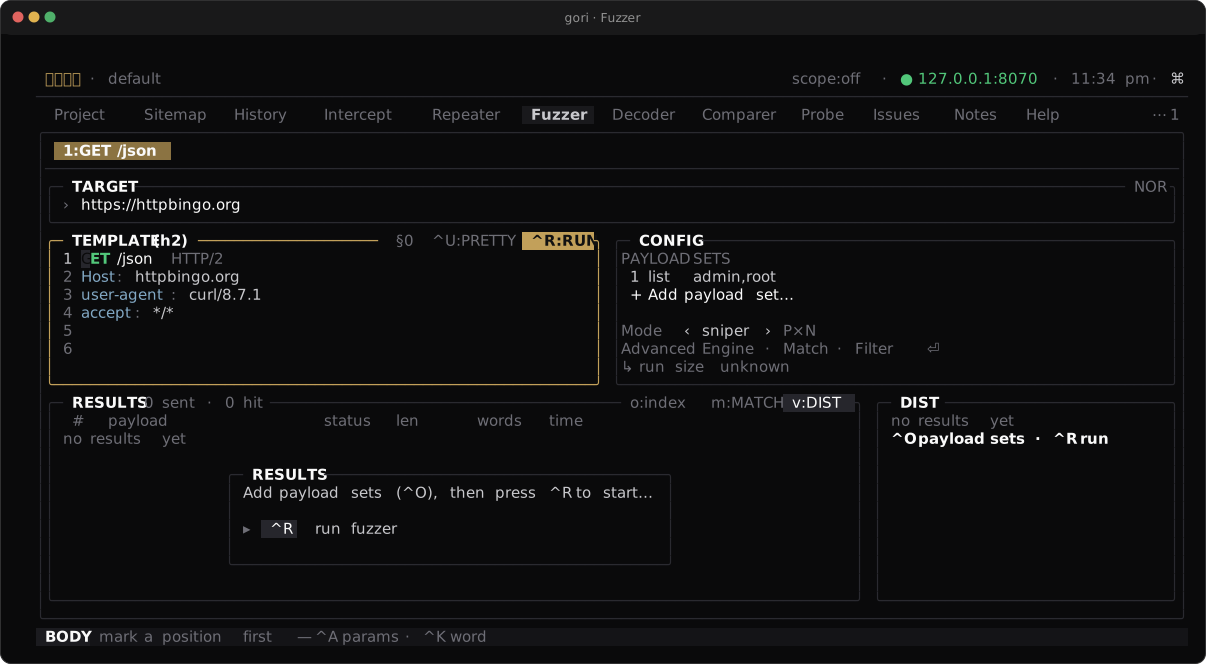
sniper mode in the CONFIG pane, and the results table filling as each request lands.Checkpoint. The results table fills as requests land; sort it by status or size to bring the outliers to the top.
5. Read results and seed the next step
The finding is the row that doesn't match its neighbours: an unexpected 200 or 500 where the rest 404, or a length that jumps when one payload lands differently. That row is a lead, not a conclusion: from a result, its Space menu sends it on to the Repeater, or to the Comparer to diff it against the baseline, so you keep probing the one payload that stood out by hand.
A sweep of thousands outgrows sorting. Group by shape (Space → Z Display…, then Group by shape) folds RESULTS into one row per distinct answer, with payload echoes, ids, numbers, timestamps and per-response headers ignored, and lists the rare shapes first, so the one response that behaved differently sits at the top instead of at row 7,312. → opens a cluster to its members and ← folds it again. Headless, a saved run answers the same question with gori run fuzz show RUN_ID --clusters; see Grouping Results by Response Shape.
To keep the complete run, leave the editor in READ mode and press Shift-E after it finishes. During the sweep gori privately spools every full request/wire/response row to disk while the pane stays bounded to 5,000 rows / 64 MiB; Shift-E promotes the complete spool into the project. The latest successful run reopens automatically as a bounded window with its Fuzzer session; Run history (type it into Ctrl-P) selects an older run, while CLI/MCP can page the whole archive. Headless, make persistence explicit and inspect it by id:
gori run fuzz save <flow-id> --auto --wordlist params.txt --mc 200,302
gori run fuzz list
gori run fuzz show RUN_ID
gori run fuzz show RUN_ID RESULT_INDEX --format json
On a long sweep, --keep interesting (the ADVANCED card's Keep interesting only) stores only the matched rows, the ones carrying a fault (an error, a re-send, a truncated response) and the row that stopped the run, instead of every row.
The original gori run fuzz … remains ephemeral, so an existing script does not start growing the project database after an upgrade.
Hidden parameters the app never named at all are a different job. Where the Fuzzer varies a value you can see, the Miner guesses candidate names the server accepts but doesn't advertise; see Param Miner.
Next Steps
- Carry a session: replay every later request as a logged-in user
- Fuzzer reference: attack modes, payload sets, and matchers in full
- Param Miner: find the parameters the app never named