








A capture is a flat log; an attack surface is a shape. This playbook folds your captured History into a deduplicated host → path tree, collapses the id noise that hides the shape, then runs Discover to pull in the endpoints no click ever reached. It takes about ten minutes, most of it Discover working in the background.
Before you begin. Finish Set up an engagement so a project and its scope are in place, and browse the target enough that History has rows to fold. Step 3 sends real, unsolicited traffic, so run it only against a host you are authorized to test. The examples use
api.example.comas a stand-in.
1. Browse to seed the map
Leave capture on (c toggles it) and click through the app the way a user would: log in, load the main views, submit a form. Then open Target → Sitemap. It collapses every flow in History into a deduplicated host → path tree, with a method chip on each endpoint and scope markers down the side, so a few hundred rows read as a dozen paths.
gori run sitemap
The tree is a view over the capture, not a second copy; anything you browse next appears the moment it lands. --in-scope limits it to in-scope hosts, matching the scope lens, and --hide-static leaves out images, fonts and media (in the TUI, Space Z s under Display…, a lens History shares).
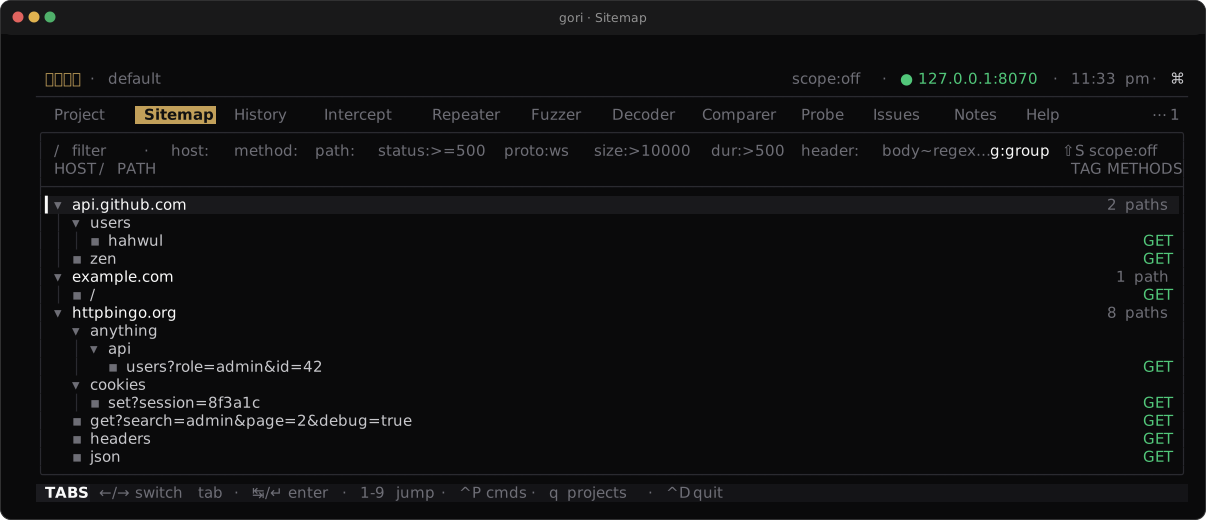
host → path tree with method chips and scope markers, the shape of the surface you're about to test.Checkpoint. Your target host expands into a tree of paths, each carrying its method chip.
2. Fold noisy ids
A REST API buries its shape under identifiers: /user/1, /user/2, /order/9f3c… are one endpoint wearing a hundred faces. The Sitemap folds path-param ids for you, so /user/1 and /user/2 share one node and a long id collapses into a single {uuid}. What was a wall of near-identical rows becomes the handful of real endpoints behind them. Query-string variants fold the same way (/search?q=1 and /search?q=2 onto /search). Both folds are on by default: g toggles the id fold and Shift-G the query fold, for the rare time you need every literal value.
gori run sitemap            # folds ids by default; --no-group shows every one
                            # /search?q=1 + /search?q=2 fold onto /search; --no-fold-query splits them
Checkpoint. Numeric and uuid-shaped segments collapse to one node each, and the tree shrinks to distinct endpoints.
3. Find what you never clicked with Discover
The Sitemap only knows what you browsed. Discover finds the rest: it spiders links you never clicked, reads what the target says about itself (robots.txt, sitemap.xml, the .well-known/ registry) and the paths quoted in its JavaScript, then brute-forces unlinked directories (/admin, .git/config, /api/v2). Open Target → Discover, or from a Sitemap node or a History flow press Space > D (Send flow to… → Discover here) to confine the run to that subtree. The popup chooses the exploration style (spider, brute-force, or both), a max depth, the crawl scope, and concurrency; the run happens in the background, and ^X stops or p pauses it from the Discover sub-tab.
gori run discover --target https://api.example.com \
  --max-depth 3 \
  --extensions php,json,bak \
  --format jsonl
Discover sends real, unsolicited traffic to the target: an actual request for every path it guesses. Run it only against systems you are authorized to test. It stays inside your project scope, and the sandbox and exclude rules are always respected.
Captured JavaScript names endpoints too, and reading it sends nothing. Space J (Scan JavaScript) on the Sitemap reads the JS responses and inline scripts already in the project and draws the paths they reference but no request reached as dimmed js rows. Headless, gori run sitemap js --scan lists them, and gori run sitemap --js-refs draws them in the tree.
Checkpoint. New paths appear in the Sitemap that you never browsed, and the run summary reports what it found and what its calibrator suppressed.
4. Read and act on the surface
A Discover finding is more than a URL. gori stores the request it framed and the response the origin sent, so the tree is evidence you can read. Select a discovered node and press o to open that exchange in the same detail view History uses (Enter only expands or collapses a node): headers, body, pretty-printed JSON. From there ^R sends it to the Repeater to start poking at it by hand.
As you triage, mark the paths that matter with t (a run of t marks consecutive rows), and use the Space menu to tag them or add the host to scope from right here, so the endpoints you care about survive the next capture. Nothing sends traffic on its own; you decide what to open and what to chase.
The tree reads two more ways. p on a host or subtree lists every parameter name its requests carried, where it appeared and whether a value came back reflected (Target → Params, gori run sitemap params). ⇧E writes the selected host or subtree as an OpenAPI 3.0.3 document, with templated paths and inferred schemas but never a credential value (gori run sitemap export).
Checkpoint. You can open a discovered endpoint, read its real response, and send it onward to the Repeater.
Next Steps
- Intercept and modify in flight: hold one of these requests and change it on the wire
- Proxy & History: the full Sitemap reference, folding, and marking
- Scanning & Issues: Discover's calibration, containment, and headless flags in depth