








Once you've captured an interesting flow, Repeater and the Fuzzer are where you test it.
Repeater
Repeater is a request workbench. Send a flow to it, edit any part of the request, and re-send. The response, timing, and a diff against the previous response are shown side by side. Sessions persist with the project, so you can come back to them later.
Paste a curl command to start from one: Space → Paste cURL (U), or the palette, opens a box you paste into, and Enter opens each request as a new sub-tab. It reads the command with curl's own meaning of every flag (-b is a cookie, -d a body, -u basic auth, -G moves the data into the query), keeps each -H line exactly as typed and in order, and leaves out curl's own User-Agent/Accept, so a request gori exported with Copy as → cURL comes back byte-for-byte. Like a shell, Enter continues a command that ends in \ or an open quote. Transport flags (-k, -x, -L, --resolve, timeouts) are ignored and named in the status line, since gori sends through its own network settings, and a flag that reads a local file (-d @body.json, -F f=@a.png, -T) is refused with the reason. gori parses the command; it never runs it.
Ask a GraphQL endpoint for its schema without typing the query: on a tab that holds a request to the endpoint, Ctrl-P → GraphQL: insert introspection query rewrites it into a POST of the standard introspection query (the one GraphiQL sends) to the same path. The target, the active session slot and every other header stay as they were, each with its own line ending, so the query goes out with the session you are testing; only Content-Type and Content-Length are replaced (a Transfer-Encoding or Content-Encoding is dropped, since the new body goes out as plain JSON), and a GET binding's query/variables/operationName/extensions parameters leave the request line. GraphQL: insert legacy introspection query drops subscriptionType and the directives block for an older server that fails the whole query on a field it does not know. Either is one undoable edit (Ctrl-Z), and nothing is sent until you press Ctrl-R. A hex, WebSocket, gRPC or SAML tab, or one holding a %%% group, refuses it with the reason.
Test a per-request rate limit on GraphQL: Ctrl-P → GraphQL: multiply operation (batched array) packs 100 copies of the tab's operation into one batched JSON array, and GraphQL: multiply operation (aliased) repeats its top-level field under 100 aN: aliases in one document. Only the operation is rewritten, so variables, operationName and the headers stay as they were (Content-Length follows the body when auto-length is on); trim the copies in the editor before Ctrl-R. Either is one undoable edit, TUI only. A body that is already a batch, a form or a GET request is refused with the reason, and the aliased form also refuses fragments or several operations.
Once a few dozen have piled up, the chip strip scrolls and hunting along it with ←/→ stops being practical. Press f anywhere on the strip and every session is listed, filtered as you type by name, method, path, target host or #tag; Enter jumps to the one you picked. The same list sits behind the ⌕ at the strip's left edge; click it, or reach it with ← from the first chip. Every workbench strip has both: Fuzzer, Notes, Decoder, JWT, Cookie, Comparer, Miner and Sequencer alike.
Sub-tabs can also be marked for a batch. On the strip, t marks the chip under you and steps right, Shift-T marks every chip the / filter shows, and Esc clears the marks before it leaves the strip. A marked chip wears a ▌ bar. Marks change what the sub-tab actions act on, not which actions exist, the rule History's list already follows:
the target is the marks if any are set, else the active chip
So Shift-T → Ctrl-W closes every open session behind one confirm, Ctrl-R sends the marked ones together (each on its own connection, up to 20, after a confirm), Space → d duplicates them, and Space → g tags them all with what you type (t on the strip marks, and so does the menu's t, so tagging keeps its own letter). From a body pane the same rows are one level down, under Space → T (Sub-tabs…). The space menu opened from the strip reads SPACE · 3 MARKED and its entries rename themselves (Close 3 sub-tabs, Send 3 sub-tabs); an action that stays single-target says (cursor). A mark the filter is hiding is called out in the confirm rather than closed quietly. Every workbench strip marks and closes this way (Fuzzer, Notes, Decoder, JWT, Cookie, Comparer, Miner and Sequencer alike), and all of them but Sequencer duplicate too; sending is Repeater's.
Three request-pane actions send more than one request at once. Space → G (Race marked sub-tabs) fires the marked sub-tabs (at least two, up to 20) as one synchronized race: over HTTP/1.1 each goes on its own connection with the last bytes released together, over HTTP/2 as a single-packet send. Every marked tab must share one origin, transport, SNI and TLS preset, and be all captured or all hand-written, and each response is shown with its timing. Headless it is gori run repeater race <id> <id>… (CLI Reference); over MCP, race_requests. Space → g (Send group (one connection)) pipelines every request in the pane, split on a lone %%% line, over one keep-alive connection and shows each response; it works on HTTP/1.1 in plain-text mode only.
Space → B (Timing analysis (A vs B)) is a differential timing test over exactly two marked sub-tabs: the earlier chip on the strip is A, the later one B. It asks how many pairs to send (30 by default, up to 500), discards 3 warm-up pairs, then releases A and B together each time the way a race does (HTTP/2 single-packet on one connection, HTTP/1.1 last-byte sync on two), so network and server-load noise hits both alike. The verdict is taken on response order, not on latency: in how many pairs A arrived after B, with a two-sided sign test that must clear p < 0.01 to name a side. The card reports A consistently slower, B consistently slower, no measurable difference, or inconclusive when fewer than 20 pairs had both responses, next to each variant's min/quartiles/max and distribution, never a single number. A pair where either side errored is dropped rather than counted fast or slow. The pair must share one origin and transport, as a race does, and Esc cancels a run. Headless it is gori run repeater timing <idA> <idB> (--count, --warmup, --interleaved to send A and B one after the other, alternating which goes first, instead of racing them, --format json); over MCP, timing_requests.
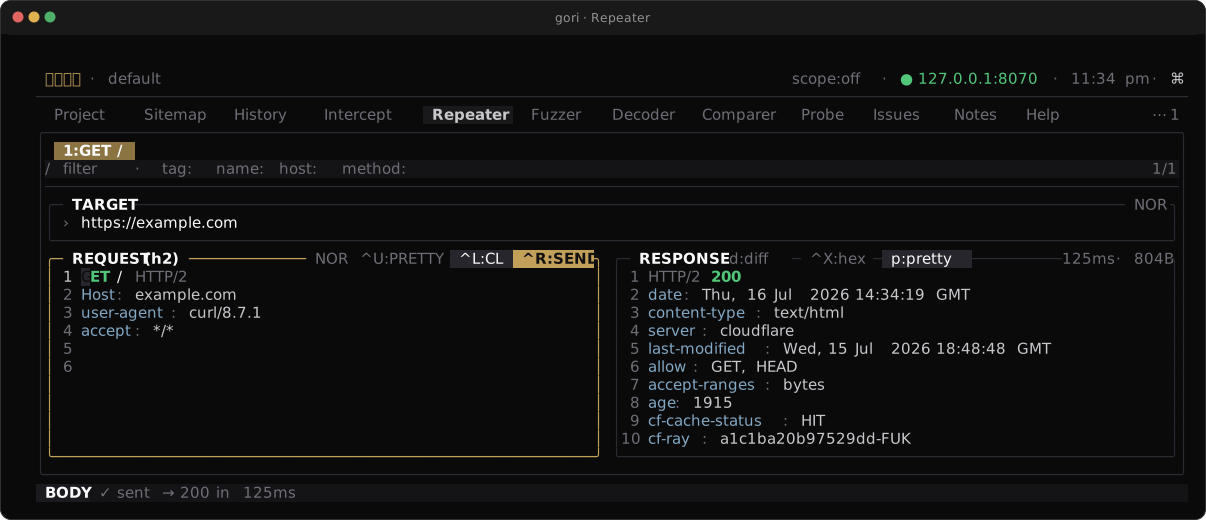
Repeater handles more than HTTP/1:
- HTTP/2 requests are re-sent over a real h2 connection.
- WebSocket repeater opens a handshake (an RFC 6455
Upgrade:request over HTTP/1.1, or an RFC 8441 extendedCONNECTover HTTP/2, whichever the session holds), then replays your messages one at a time: each one goes out, the server's answer is drained until the socket falls quiet, and only then does the next leave. - gRPC repeater reuses the HTTP/2 engine for framed messages. A unary call (exactly one framed message) exposes its payload for hex editing with
^X, and, when a descriptor set declares the rpc, for FIELD editing with␣Pf: pick a schema-known field, type a value, and the message is re-encoded around it with every other byte copied from the capture (.protoas a lens). A compressed message (grpc-encoding: gzipordeflate) is inflated for the form and re-compressed with the same codec when you apply an edit, flag kept; the form's status line and the transcript (re-compressed gzip) say so, because the octets no longer match the captured deflate stream.^Xstill edits the compressed bytes as captured. With a descriptor set,Ctrl-P→ Edit gRPC message as JSON edits the whole message as proto3 JSON and adds any field the capture lacks; Add gRPC field sets or adds one frompath=value(or removes one with-path), by field number when no schema is loaded, andgori run repeater send --grpc-field/ MCPgrpc_fieldstake the same spec (adding a field). A 0- or multi-message body is re-sent verbatim. The 5-byte length prefix in front of the message is governed by the␣Pr:FRAMEtoggle on the request card. It is on by default in the tab, so an edited unary message goes out well-formed and the origin accepts the call. Turn it off to send the captured prefix in front of your edited payload, because a prefix that disagrees with its payload is one of the standard gRPC parser tests. Headless the default is the other way round:gori run repeater send(MCPsend_request) sends the prefix as captured unless you pass--reframe-grpc/reframe_grpc: true. - A decode mode re-encodes edited SAML / GraphQL payloads on send. (To decode or edit a JWT, send it to the JWT tab; the Decoder's
jwt-decodeonly reads one.)
That one-at-a-time order is the point on WebSocket. A socket carries a conversation, so a script whose third message depends on the answer to the second only replays faithfully if gori waits in between, and the transcript then reads in wire order, instead of listing everything you sent ahead of everything the server said. Three things follow from it:
- A run costs at least one quiet gap per message (three seconds of server silence, by default). A long script against a server that answers nothing is the slow case.
- gori stops when the peer does. If the server sends a
CLOSE, or the connection ends, the rest of your script is not written into a socket nobody is reading; RFC 6455 forbids data frames after aCLOSEanyway. The result says how many of your messages actually went out. - A
CLOSEyou wrote does not stop it. Sending data after your ownCLOSEis a protocol test, and Repeater lets you run it, as it does an unmasked frame, a lone continuation, or a length header that disagrees with its payload.
The WebSocket Repeater does not negotiate permessage-deflate, and the capture proxy disables it by default. A Match & Replace head rule can deliberately restore the extension offer; a session captured that way holds the extension-encoded bytes and cannot be replayed. Re-capture it without that rule (or with compression disabled in the client).
A live session
The scripted replay above re-dials for every message. To keep ONE socket open and talk on it the way Burp's WebSocket Repeater does, turn on Live session (keep open) — Space → P Protocol…, then Live session (o). It is a sticky toggle on the handshake: with it on, ^R connects once and holds the socket open instead of running the script. The MESSAGES list on the left is the composer — ↵ sends the line under the cursor, and ^R sends every line in order — and each line it sends is marked ✓ ss.mmm at its right edge. The right-hand TRANSCRIPT streams both directions as the frames arrive, each row ss.mmm → … for what you sent and ← … for what the server pushed, with ↺ on a heartbeat gori answered for you. The MESSAGES title shows ● LIVE and the TRANSCRIPT title ● open <duration> while the socket is up, and the status bar carries the URL, ↑sent ↓recv and the duration. Ctrl-P → Send WS message as binary (hex) sends the cursor line as a binary frame, the line read as hex.
Toggle Live session off to disconnect (gori sends a CLOSE and hangs up), and closing the sub-tab, leaving the project or quitting all close the socket too. Engine.IO heartbeat (Space → P, then b) answers the server's Engine.IO ping (2) with a pong (3) for the duration of the session, so a long-lived socket is not timed out by a missed app-level heartbeat; it is off by default and takes effect at the next connect. The transcript is held in memory only and capped — a long session drops its oldest rows, and the transcript says how many — and, like every Repeater WebSocket send, nothing of it is written to History.
Replay from the command line, optionally against a new target, or keep a WebSocket session open with repeater ws:
gori run repeater <flow-id> --target https://staging.example.com --diff
gori run repeater ws <repeater-id> --engine-io --for 30s
Environment Variables
Outbound requests carry three kinds of token, told apart by their namespace:
| Token | Resolves from | When |
|---|---|---|
$ENV.KEY |
env vars, global or per-project | at build time, before the request is framed |
$BIND.NAME |
a session binding an extract rule filled | at send time, out of the active identity's table |
$GEN.NAME |
a built-in value generator | at send time, once per outbound request |
Tokens stay as literal text in the editor and expand only on the way out: in Repeater, the Fuzzer, the Miner, Intercept forwards, gori run, and MCP send_request. In a Repeater request opened from a capture, or a message held at Intercept, a token the captured bytes already carried is sent as it was; only the ones you type expand.
GEN provides the values commonly needed while probing a target, without a Decoder chain:
| Token | Output |
|---|---|
$GEN.UUID |
UUID v4 |
$GEN.RANDOM |
cryptographically secure unsigned 64-bit integer, in decimal |
$GEN.RANDOM_HEX |
128 cryptographically secure random bits, as 32 lowercase hex characters |
$GEN.TIMESTAMP |
Unix time in seconds |
$GEN.TIMESTAMP_MS |
Unix time in milliseconds |
$GEN.ISO8601 |
current UTC time in RFC 3339 form, with milliseconds |
$GEN.USER_AGENT |
a real desktop browser User-Agent (Chrome, Edge, Firefox, Safari), drawn at random from a list built into gori, so two sends can get the same one. On an https/wss request whose TLS preset is chrome, firefox or safari (the send's own, or the destination's outbound_tls rule), it draws only from that browser, so the header agrees with the handshake. It contains spaces, so use it in a header, not the request line |
$GEN.USER_AGENT_CHROME |
the same, narrowed to Chrome and Edge, to pair with the chrome TLS preset |
$GEN.USER_AGENT_FIREFOX |
the same, narrowed to Firefox, to pair with the firefox TLS preset |
$GEN.USER_AGENT_SAFARI |
the same, narrowed to Safari, to pair with the safari TLS preset |
$GEN.TOTP |
the current RFC 6238 one-time code for the secret in the env var TOTP_SECRET |
To draw from your own list instead, open Settings → Editor & Keys → User-Agents (or Ctrl-P → Settings: User-Agents) and enter one User-Agent per line, or run gori settings user-agents --set FILE (- reads stdin; --reset goes back to the built-in list). Your list replaces the built-in one. A family name with none of your lines, for example $GEN.USER_AGENT_SAFARI with no Safari line, still uses the built-in family. Under a browser TLS preset, the plain $GEN.USER_AGENT uses your lines of that browser, or all of your lines when you listed none of it. gori settings user-agents prints the list in use, and MCP list_env reports whether it is yours.
$GEN.TOTP lets a login that asks for a second factor be replayed, including a session slot's refresh steps. Set TOTP_SECRET to the test account's secret: the base32 secret an authenticator app shows (letter case and spaces do not matter, and padding may be left off), which means SHA1, 6 digits and 30 seconds, or the whole otpauth://totp/… URI behind the enrollment QR code, whose digits, period and algorithm (SHA1, SHA256 or SHA512) apply. Prefer the global layer, because a project export carries the project's env vars. When the var is unset or does not parse, a Repeater send, gori run send/repeater, MCP send_request and a refresh step whose HTTP request carries the token are refused before they dial, with a message that names the var and never its value; MCP list_env reports the same reason as the generator's unavailable. Elsewhere (the other tools, a WebSocket message, a session slot's header) the token goes out as text. A code stays the same for its whole period, so a server that rejects a reused code fails a second login inside one period. A code is only as right as this machine's clock, and a wrong secret or a skewed clock fails every refresh: automatic refresh stops after three failures in a row, but a target that locks the account sooner can lock it first, so run the refresh by hand once before arming refresh before. TOTP_SECRET itself never expands as $ENV.TOTP_SECRET (only $GEN.TOTP reads it), and MCP list_env never returns its value, even with include_sensitive.
The same generator name used more than once in one request has the same value. The next request mints again. Generators run only for operator-authored request text at the final send seam; captured evidence and Fuzzer payload bytes remain literal.
Define env vars in two places (project wins on a key collision):
| Layer | Where |
|---|---|
| Global | Preferences (Ctrl-,) → Editor & Keys → Env, Ctrl-P → Settings: Env, or the env section of settings.json |
| Project | Project tab → ENV pane (a add, e edit, d delete) |
The namespace is uppercase and case-sensitive; the name after the dot is A-Z a-z _ followed by A-Z a-z 0-9 _. The sigil is $ by default (changeable via Change prefix, which the palette finds from the ENV pane, or env.prefix in settings); the namespace spelling is not.
Anything else that starts with the sigil is a byte. A GraphQL variable ($id), a MongoDB operator ($ne), an OData option ($filter) and a JSON Schema keyword ($ref) are not references and need no escape: paste that body and send it as written. To ship the text of a token itself, double the sigil: $$ENV.KEY sends $ENV.KEY, $$BIND.NAME sends $BIND.NAME, and a bare $$ is two literal bytes. Each pass consumes only its own escape, so $$BIND.NAME survives env expansion and $$ENV.KEY survives the binding pass.
That "a bare $NAME is just a byte" rule is about request text (a body, a header, a payload you pasted). It does not hold in a Match & Replace replacement, which exists only to inject a value: a bare $NAME there that names a known env var, extract rule or claimed session binding is a rule the grammar moved out from under, so gori does not apply that rule and writes an event naming the re-spelling. Fix it to $ENV.NAME / $BIND.NAME, or write $$NAME if the literal text really is what you meant.
An unknown token stays visible as literal text wherever a request is shown. The editor keeps what you typed, and the highlighter marks an unregistered token differently from a registered one. It is not sent, though: Repeater, the Fuzzer, the Miner, the Sequencer and Discover each refuse a run whose request line, headers or target still name a variable that resolves to nothing, and say which one, as do minimize, an intercept forward you edited, and a WebSocket message. Set it, or drop the token. The check covers the request head only. A $ inside a body is treated as a byte, so binary uploads replay unchanged. A WebSocket text message has no head, so the whole payload is checked; a binary message is never checked, and never expanded.
GET /api/me HTTP/1.1
Host: api.example.com
Authorization: Bearer $BIND.SESSION
X-Api-Key: $ENV.API_KEY
Values that appear in captured traffic can be masked back to their token when copying or displaying, so secrets stay as tokens rather than raw strings.
Bare syntax, and the automatic upgrade
Namespaced is the grammar. A project written before namespaces existed is re-spelled automatically the first time it opens, in the TUI, in a gori run …, or in a gori mcp server, whichever gets there first:
- Repeater drafts and their WebSocket frames, Fuzzer templates, Miner and Sequencer requests, rewrite-rule replacements, session-slot headers, and the tokens a masking pass wrote into issue titles and notes.
- Captured evidence is left exactly as it was. A capture expands nothing, so its
$idis a byte the origin sent. - A backup of the database is written beside it first (
gori.db.pre-namespaced-<timestamp>), and the run that does the work prints one line per project saying how many tokens moved and where the backup is. Global rewrite rules live insettings.jsonand are re-spelled by the same start, with asettings.json.pre-namespaced-<timestamp>copy; one that names a project var or an extract rule is named for you to fix instead, because a rule that rewrites every project cannot be re-spelled from inside one.
gori settings env-syntax        # print the grammar in force, and where it came from
gori settings env-syntax bare   # opt out
That command is the only switch. No TUI key sets the grammar, because switching it has to
re-spell stored tokens, which a setting on its own cannot do. A TUI session or a gori mcp server
that is already running follows the switch on its own: it picks up the new grammar, re-spells
the project it has open, and says what it did (a notification and an ACTIVITY row in the TUI, a log
line for MCP).
env.syntax = bare is the opt-out: bare $KEY for an env var, bare $NAME for a binding, $$ for a literal $. Each project re-spells itself back the next time it opens, escaping a literal $NAME that would otherwise start resolving. Note that bare is the ambiguous grammar: a GraphQL $id in a body really does collide with an env var named id, which is what the escape and --verbatim are for. Generators have no bare spelling: $GEN.UUID remains literal under the bare grammar. The rest of this documentation spells tokens the namespaced way; on a bare install, read ENV and BIND tokens without the namespace ($KEY, $NAME).
Fuzzer
The Fuzzer is an Intruder-style engine: mark positions in a request, attach payload sets, and send the matrix of requests while matching on the responses.
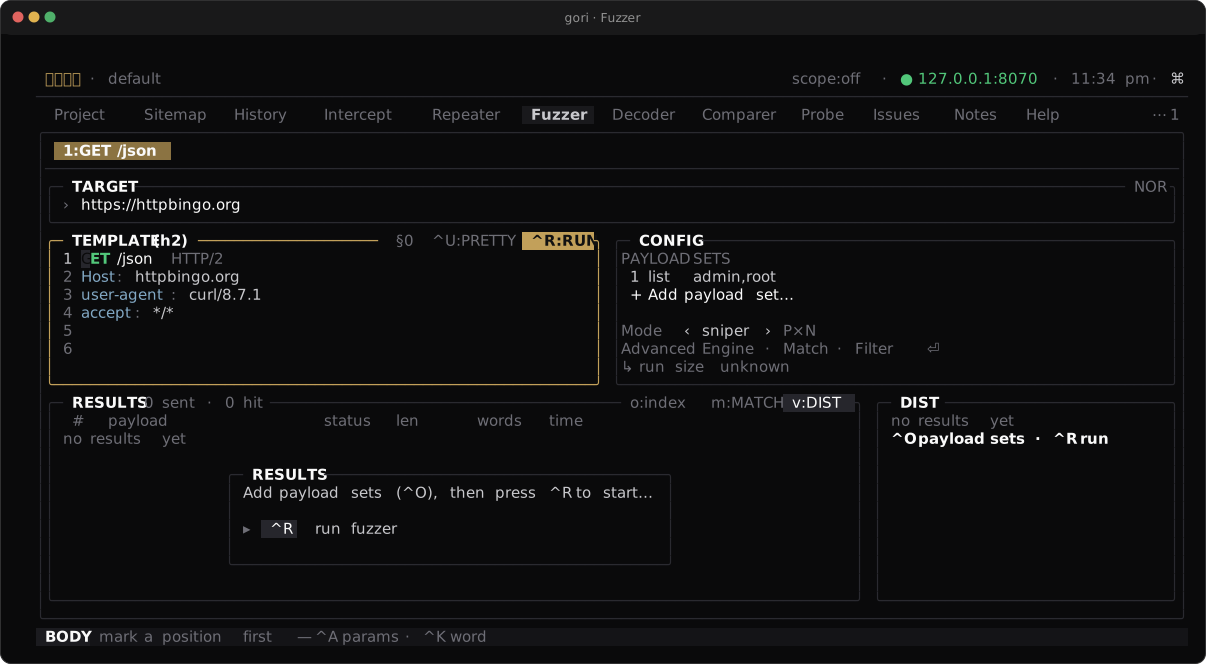
§…§ markers in the template, payload sets and mode in CONFIG, a live results table, and a status / size distribution sidebar.Attack Modes
| Mode | Behavior |
|---|---|
sniper |
One position at a time, cycling a single payload set (default) |
batteringram |
The same payload in every marked position |
pitchfork |
Parallel sets: payload n from each set together |
clusterbomb |
Every combination across all sets |
The first two take one payload set; the last two take one per marked position. Pass more sets than the mode consumes and gori says how many it will not draw from, and how to use them, before the run starts. Two wordlists under the default sniper sweep the first one into every position.
Positions and Payloads
Mark positions with §…§ markers in the request, or let gori place them automatically. Payload sets can be a built-in preset (sqli, xss, traversal, format-string, bad-strings, command-injection, cache-delimiters) for a fast start with no file, a wordlist (a file, or the name of a list in the catalog), an explicit list, a numeric range, N empty (null) payloads, or brute-force character sets. A preset can merge an extra file (built-in first, de-duped), and composes with any other set. Processors let you transform each payload on the way out: prefix/suffix, URL/base64/hex encoding, case folding, hashing, or a regex replace.
A gRPC message is the one place a marker cannot go usefully; see Sweeping a gRPC Field, where the position is a schema-known field rather than a byte range.
A single marker can also carry a Decoder chain of its own. Put the cursor inside it and press Ctrl-Q to open the chain editor, which previews the marker's value through each step before you send (an exec: step is withheld from the preview and runs only on send). Anything you saved in the Decoder library can be called there by name, so a chain you built once is one word in a marker: §admin¦myenc > url-encode§. Repeater markers work the same way in the TUI tab. Markers are a drafting language the tab renders on send, so the headless surfaces do not render them: gori run repeater send, MCP send_request and a retest step refuse a session whose §…§ the tab would render, rather than put the literal § bytes on the wire. Remove the markers before sending from there, sweep the marked request as a Fuzzer template (gori run fuzz --request=FILE, fuzz_start{template}), or pass --verbatim / verbatim:true to say the stored bytes are the message. A § the capture itself carried is untouched: gori cannot tell it from one you typed, so the tab leaves it inert and every surface replays it byte-exact.
Wordlist Catalog
Lists you reuse live in one place, wordlists/ under GORI_HOME (~/.gori/wordlists by default). Every file there is a named list, and a name works anywhere a wordlist path does, from any working directory: gori run fuzz -w common.txt, gori run mine --wordlist common.txt, discover --wordlist, cookie --crack --wordlist, the Wordlist payload set in the Fuzzer, and the wordlist argument of the MCP fuzz_start, mine_start, discover_start and cookie_crack.
- Resolution. A value with a
/in it is a path and is opened exactly as given. A bare name is looked up in the current directory first, then in the catalog, so a file you have right here still wins over a saved list of the same name. A bare name found in neither place is refused as not found;fuzz -wand Cookie cracking also say the two places they looked. - Names. Letters and digits of any script,
_,.,+,-and inner spaces, at most 200 bytes, never starting with.or-. A name is a file name, not a path: nothing that can leave the directory is accepted, andgorirefuses to write through or over a symlink you keep there. - The bytes are never normalized. A list is the raw file. A blank line and a line starting with
#are payloads to the Fuzzer, while the Miner and Discover keep reading those two shapes as formatting, exactly as they do for a path. Saving keeps every line as given. - Managing lists.
gori run wordlistlists, shows, saves, renames and deletes them (see the CLI reference); in the TUI,Ctrl-Sin the List payload editor saves the values as a list, the Wordlist type's blank-field dropdown offers your favorites, recents and the catalog (by name), andwon the Target → Params sub-tab saves the listed parameter names into it; agents uselist_wordlists,get_wordlist,save_wordlist,rename_wordlistanddelete_wordlist(the MCP guide lists them). - Safe by default. Listings and
shownever print a list's values (a list can be a credential list):gori run wordlist show NAME --head Nand MCPget_wordlist{include_values:true}are the explicit ask, and both are bounded. Saved lists are owner-only (0600in a0700directory), written atomically, and never replace an existing list unless you say so (--overwrite,overwrite:true, or a secondEnterin the TUI). Listing a multi-GB list costs astat; a line count reads at most 32 MiB. - Not a project feature. The catalog is global, and a project never silently inherits a list: a name is something you typed. Contents are newline-delimited text; there are no descriptions or tags.
# a list saved once, used from anywhere
gori run sitemap params --host api.example.com --format names | gori run wordlist save api-params.txt
gori run mine 42 --wordlist api-params.txt
Payloads from the Project
The project already holds the target's own vocabulary: the parameter names its endpoints take, the values its clients send, the paths it serves, the endpoints its JavaScript points at, the tokens your extract rules pull out. A project payload source turns a slice of that into a set without a wordlist file to write first. It has two parts: a QL query that picks the flows, and a projection that turns them into values.
gori run fuzz 42 --auto --payload-from 'host:api.example.com param-values'
gori run mine 42 --payload-from 'host:api.example.com param-names'
| Projection | Values |
|---|---|
param-names |
Parameter names of the selected requests (a JSON member contributes its leaf name) |
param-values |
Parameter values, decoded once (hello%20world is hello world), so a query or form position encodes them exactly once |
path-segments |
Request-path segments as captured (percent-encoded, which a path position takes raw) |
js-endpoints |
Endpoint paths found in the selected flows' JavaScript. It reads what gori run sitemap js --scan stored and scans nothing |
extracted |
Values your stored extract rules pull out of the selected flows' stored responses (extracted:NAME for one rule): the rule's host glob and condition apply as they do live. Needs the sensitive opt-in |
The descriptor is <QL> <projection>: the last word is the projection, and everything before it is the query (quote a value containing spaces, as QL always asks). A lone projection reads every flow. It reads the project and sends nothing: a source is built with nothing resolved, and the plan builder reads the project once, the same way on every surface, so the request count in the preflight and the confirm is the resolved size.
- The selection is strict. A field QL does not have (
methd:GET), a term QL would silently drop (status:>=oops, which would otherwise select the whole host) and a regex that cannot compile are refused, naming the term. A source is an exact selection, not a search you can eyeball. - Bounded and reproducible. It reads the newest 2000 flows, keeps at most 10,000 distinct values within an 8 MiB budget, skips a value over 4096 bytes and counts it. The order is newest flow first and first sighting wins, so the same project and options give the same list. What ended a read short is said, never silent:
--payload-from-max-flowsand--payload-from-max-valuesraise the first two.js-endpointsis one read of the stored references, so--payload-from-max-flowsdoes not apply to it and its value cap tops out just under 50,000 (the report names the cap it applied). - Secrets stay out by default. Only the request's own inputs (query, form, multipart, JSON) are read; cookies and headers need
--payload-from-locations. A value the project's redaction policy would mask (a credential-named field, a JWT or key shape, a JavaScript endpoint with a token in its path) is withheld and counted. A parameter name is never withheld, because a name is not a value.--payload-from-sensitive(MCPinclude_sensitive) is the explicit opt-in; it is reported on the run, andextractedrefuses to run without it. The live session-binding table is never read:extractedre-applies the stored rules to stored responses and stores nothing. - Values are kept as captured. Nothing is trimmed or filtered. A value holding CR, LF or NUL is kept and counted in the report (
framing_values), and what a position does with it is that position's own rule: query and form positions percent-encode it, a path position takes it raw. - An empty source is a refusal, not a clean run of zero requests. The message says why: no flow matched, nothing of that kind was in them, or everything was withheld as sensitive.
- Where it works.
gori run fuzzandmine(repeatable--payload-from, with--payload-from-sensitive,--payload-from-locationsand the two caps applying to every source; a run with no--flow/--project/--dbhas no project to read and says so); MCPfuzz_start({"payload_from": "<QL> <projection>"}inpayloads, withinclude_sensitive,locations,max_flows,max_valuesbeside it) andmine_start(payload_frompluspayload_from_*); the Fuzzer's Project payload type, which asks for the query, the projection and the opt-in (off) and reads the project when the run starts. The run says what each source read, and never returns a value:payload_sourcesin the MCP reply, onepayload-from:line on stderr, the run-start line in the TUI. - In the Miner a source must be
param-names, and its names are tested in a fixed order: your explicit--names, the project's names, the built-in list, then--wordlist, each name once at its first position. The TUI Miner popup has no text field, so it keeps seeding a mine with the names its origin's other endpoints carry automatically;--payload-fromis the headless spelling of choosing the slice yourself. - Keep one for later.
gori run wordlist save NAME --payload-from '<QL> <projection>' --project NAME(MCPsave_wordlist{payload_from}) saves the result as a list in the catalog: an explicit act that names a project. It leaves out a value with a line break (a file holds one value per line) and counts it.
This first version reports provenance per source (which query and projection, how many flows and values) and not per value.
Matching
Filter results with ffuf-style matchers and filters on status, size, words, round-trip time (--mt/--ft, in ms, the dimension a time-based blind payload is the only evidence for), and body regex (headless also line count with --ml/--fl, a response-head substring with --mh/--fh and gRPC status with --mg/--fg), plus auto-calibration to drop noisy baselines. Auto-calibration samples the target several times before the sweep and compares each response against every sampled shape, widened by the jitter those samples themselves showed, so a page carrying a per-request id or timestamp calibrates out, while a target whose samples were identical is still compared exactly. Matched responses are highlighted.
To read values out of every response, add extractors (Display… › Extractors… on the RESULTS pane). Each one is a History column descriptor, [LABEL=]kind:selector (a header, a cookie, a JSON path, a regex capture or a byte range of the response), and draws its own results column after time, with the whole value at the top of the response detail. A saved run keeps its extractors, so reopening it shows the same columns. Headless they are --extractor=SPEC (repeatable) and MCP extractors, at most 8. The older single capture regex (--extract, MCP extract) is extractor 0, labelled extracted. The request side (req:) is refused, since a fuzz row's request is the template plus the payload. MCP shows a cookie or credential-header extractor as [REDACTED] unless include_sensitive:true.
The ADVANCED card also holds the run-shaping rows. Stop after N hits and Stop on (DIM:SPEC) end a sweep early once the matchers have hit N times or a response meets one condition; a run that stops this way ends condition_met rather than stopped. Keep interesting only makes a saved run keep just the matched rows and the ones carrying a fault (a send error, a marker chain that failed, a re-send, a truncated response) or the stopping row. Race (N conns) replaces the payload sweep with N copies of the request released together (last-byte sync), and Max requests caps the true wire count. Headless these are --stop-after-matches, --stop-on, --keep, --race and --max-requests; see the CLI Reference.
Grouping Results by Response Shape
A 10,000-row sweep is usually a handful of distinct answers. Group by shape (Space → Z Display…, then Group by shape) turns the RESULTS list into one row per answer: its size (▸×1204), then a representative result (the lowest-index one) with its status and metrics. Rows share a shape when they are the same answer whatever payload produced it: a reflected payload (as sent, HTML-escaped in any of the common quote spellings, percent-encoded or JSON-escaped), numbers, ids, hashes, timestamps and whitespace are normalized away, and so are headers that change per response (Date, ETag, request ids, Content-Length). The status, gRPC status, WebSocket close code, a truncated or timed-out capture, a set cookie, a redirect target and the body's words are not, so two 200s of the same length with different bodies stay apart, and a timeout never groups with a short 200. A failed send groups by its kind (refused, timeout, TLS, reset, blocked by scope). → opens a cluster to its members, ← folds it (from a member too), Cycle sort (Space → o) orders clusters rare first, largest first or by first appearance, and the matched-only lens keeps the clusters holding a hit. Past 4,096 distinct shapes, new ones stay ungrouped, and the RESULTS border counts them (and the hits among them). Counts cover the whole run, including rows past the display window and every stored row of a reopened run. Grouping never changes a row, its index or its match verdict.
The same clusters are on the headless surfaces: gori run fuzz show RUN_ID --clusters (and --cluster ID for one cluster's results) for a saved run, and fuzz_results{clusters: true} / get_fuzz_run{clusters: true} over MCP. Cluster ids are stable across runs of the same gori version, so one answer has one id in every run.
Saving and Reopening Runs
During a TUI run, gori writes every result to a private temporary SQLite spool while the pane keeps a bounded display window: at most 5,000 rows and 64 MiB of dynamic result data. The newest rows remain interactive; an individually oversized row is shown as metrics only. If even its payload/error text exceeds the window, the display truncates and labels those fields and disables Send to Repeater/Comparer rather than reconstructing a request from placeholders. The spool still holds the complete row. It is owner-only, cleaned in small background transactions when a run is discarded, removed wholesale when the project closes, and a spool failure never stops outbound traffic; it only makes that run unavailable for permanent saving.
After a non-empty run finishes and its spool is complete, press Shift-E in READ mode to save every spooled row permanently in the project. An uppercase E still types normally while you are editing. Saving uses row- and byte-bounded background batches, and the status line and Jobs panel report success or failure. Repeating the shortcut does not create a duplicate; a failed project copy retains its temporary spool for retry.
Reopening a project restores the latest successfully saved run for its initially selected Fuzzer session. Other Fuzzer sessions restore lazily on first selection. Restore reads only the newest 5,000 rows / 64 MiB into the pane and labels it showing N; the complete archive remains available through paged CLI/MCP readers. Active, partially failed, and legacy incomplete snapshots are never restored automatically. Open Run history (type it into Ctrl-P) to choose an older current-format run; Enter loads it and d deletes it. Closing the Fuzzer session deletes its saved-run history too; the close confirmation says so.
The headless and agent surfaces use the same permanent store:
gori run fuzz save 42 --auto --preset sqli
gori run fuzz list
gori run fuzz show RUN_ID
gori run fuzz show RUN_ID RESULT_INDEX --format json
gori run fuzz delete RUN_ID --yes
The ordinary gori run fuzz … command remains ephemeral. Over MCP, pass save_results: true to fuzz_start, then use list_fuzz_runs, get_fuzz_run, and delete_fuzz_run. Permanent runs are separate from History flows: --record-history / record_history still controls whether individual sends also appear in History.
Framing a Sweep
Content-Length is recomputed after every payload is spliced in, and one is added when the template carries a body but declares no length at all, so an ordinary sweep stays self-consistent; --verbatim (MCP update_content_length: false, or turning off Auto Content-Length on the Fuzzer's ADVANCED card) turns both halves off, because a length that disagrees with the body is the whole point of a CL / CL-TE desync test.
That second half matters more than it sounds: an HTTP/1.1 request body has no close-delimited form, so a body with neither Content-Length nor a chunked Transfer-Encoding is read by the origin as a zero-length body: the payloads go out unread while every row still reports a status. When --verbatim leaves a template in exactly that shape, gori says so before the first send rather than letting the run go quiet.
A gRPC template carries a second length declaration (the 5-byte prefix in front of each message), and it gets the opposite default: gori leaves it exactly as the payload left it, and says so once at the end of the run (2 of 3 requests left it stale, grpc_stale_prefix in MCP fuzz_status). That is the right answer when a deliberately-wrong prefix is what you are testing, and the wrong one when you are sweeping an ordinary unary call and every request is being rejected at the framing layer. --reframe-grpc (MCP reframe_grpc: true, or the gRPC reframe (unary) toggle on the Fuzzer's ADVANCED card) recomputes it per request. It is off by default on all three surfaces, and it only touches a single message: a client-streaming body, a grpc-web-text body, and a seed whose framing was already broken are left alone and still reported.
Sweeping a gRPC Field
Marking bytes inside a protobuf message is not something an operator can usefully do: the
value of an int32 field is the octets of a varint, and §…§ around them is a test of the
wire format rather than of the field. So a gRPC field position is named, not marked:
--field role, the MCP fields argument, or the gRPC field(s) row on the Fuzzer's
ADVANCED card:
gori run fuzz --flow 42 --field role --payloads ROLE_ADMIN,ROLE_USER,99
SPEC is a field name, a path into a nested message (profile.age), a field number, or
tags[1] for one occurrence of a repeated field. It needs a descriptor set that resolves the
rpc (a protoc --descriptor_set_out file or a gori run grpc reflect fetch); the field names
are the ones the Repeater's ␣Pf:FIELDS form and the History protobuf tree already show for
the same flow.
Two things follow from what a splice can do. The field has to be present on the captured
message (gori replaces an occurrence, it never adds one), so a proto3 field left at its
default is absent from the wire and is not a position; the refusal lists what the message does
carry. And a payload for a bytes field is read as hex (de ad be ef), because that
declaration's value is binary and a text field would silently send the UTF-8 of what you typed
instead of the octets you meant.
Each payload goes through the declaration on its way to bytes, which is the whole reason
the schema is needed: -3 is ten sign-extended octets as int32, one zigzagged octet as
sint32, and something else again as a bool or an enum. Everything outside the fuzzed field
is copied from the capture rather than re-serialized (an undeclared field number, a group, a
non-minimal varint, the unparsed tail of a truncated capture), and the 5-byte length prefix is
recomputed to describe the message that is actually going out. A compressed seed (grpc-encoding: gzip or deflate) is inflated to resolve the field, and each request that changes the message
re-compresses it with the same codec behind the same flag; the run says so (gRPC re-compressed gzip on the TUI summary row, the gori run fuzz note, grpc.encoding in MCP fuzz_start).
A ¦chain on a field position, and --encode/--prefix/--hash and the rest of the
processor pipeline, transform the text before the declared type encodes it. So
--field name¦base64-encode sends the base64 of the payload as that string field; the same
chain on an int32 field is refused up front, because base64 text is not an integer. (Use the
steps' | or > separators inside a chain on the TUI row; the comma there separates fields.)
Three things are refused before the first request rather than discovered mid-sweep: a field the
schema does not declare, a field whose wire type the declaration contradicts (both of which the
Repeater's form renders read-only for the same reason; ^X is still the way to change those
octets), and a payload the declared type cannot hold.
One combination is reported rather than refused: --verbatim leaves Content-Length at the
capture's value, and a re-encoded message is a different size, so every request declares the
wrong body length and is rejected at the HTTP framing layer before the gRPC layer is reached.
That is the same argument this feature makes for rebuilding the 5-byte prefix, pointed at the
other length declaration, and a CL desync is a real test, so the run says so and proceeds.
Fuzzing a WebSocket
A WebSocket session is swept like any other target, with one difference that follows from the protocol: one payload is one whole session. gori dials, performs the handshake the template holds (an RFC 6455 Upgrade: request over HTTP/1.1, or an RFC 8441 extended CONNECT over HTTP/2), sends your frame script with the payload spliced in, drains the origin's answer and closes, then does it again for the next payload. A socket is a conversation, not a request/response pair, so nothing else would attribute an answer to the payload that provoked it. Concurrency therefore means that many simultaneous sockets.
Mark §…§ positions in the frames, which is where a WebSocket app's parameters live:
gori run fuzz --repeater 7 \
  --message '{"op":"login","user":"§admin§"}' \
  --preset sqli
--repeater N on a WebSocket session seeds the handshake and the frames the session stored, so a captured exchange is swept as it was recorded; --flow N does the same from a captured socket. --message / --message-frame replace those frames when you want to author your own; --message-frame takes the same opcode=…,fin=…,rsv=…,mask=…,len=…,hex=|b64=|text= grammar as gori run repeater send, so a PING, a CLOSE with a chosen code, an unmasked client frame or a length that disagrees with its payload are all reachable. --idle-ms sets the per-session silence timeout and --ws-keep-key sends the template's own Sec-WebSocket-Key so an absent or malformed key can itself be the test (an RFC 8441 handshake has no such key, and the run says so rather than ignoring the flag).
The handshake is a position space too: mark a header or a query value in the upgrade and it sweeps alongside the frames, in one run. And --ws-http-only goes the other way: it sends the handshake as an ordinary request and reads the 101 as a response, which is how you test an origin that answers 200 to an upgrade.
Results read like any other sweep, because the inbound frames are the response body: --mr, --mh, --extract, size and word matching all work unchanged. Two extra fields carry what the handshake's status cannot, since a successful upgrade is 101 on every row whether the origin liked the payload or not:
#1     bob                       101   30B   1w   1.4ms  ws 1 frame · close 1000
#2     admin'--                  101   31B   5w   1.5ms  ws 1 frame · close 1008
ws_close_code and ws_frames_in appear in --format json and in MCP fuzz_results the same way, and only on WebSocket rows.
Six knobs do not apply: three are refused and three are inert. --race is refused outright (a race group is byte-identical copies of one request, which has no framed-exchange form), and so is --record-history, because a framed exchange is not a request/response flow and writing one would produce a History entry that claims to be a WebSocket with an empty transcript. --http2 is refused only on an Upgrade: websocket template: HTTP/2 has no upgrade mechanism (RFC 9113 §8.1), so a WebSocket over h2 is opened by an RFC 8441 extended CONNECT instead, and a seed that IS one sweeps over HTTP/2 with no flag needed, because the handshake bytes say so. --follow-redirects, --timeout and --ac are simply inert here and the run says so once, up front, rather than pretending otherwise. Each refusal names --ws-http-only where that is the way to get what you asked for; under that flag the run is an ordinary HTTP sweep, so all three work, recording included. A WebSocket seed that carries no outbound frames is swept as plain HTTP too: a handshake-only “framed” run would dial a socket per payload just to send nothing.
Rotating Tokens with a Macro
Some applications hand out a new form token or nonce on every page load or API call. A sweep then gets 200 for the first candidate and 403 for every one after it, because they all carry the value captured before the run. Waiting for a session to expire does not help: the value dies long before its session does. A macro fixes it: a short list of saved Repeater sessions that runs before a candidate, so the value its extract rule leaves in the session bindings is fresh when the candidate resolves its $BIND.NAME. The Fuzzer and the Param Miner both have one.
There is nothing new to learn about extraction or injection. The steps go through the Repeater's own send path, so the extract rule you wrote for the token works unchanged, and the candidate names the value where it belongs with $BIND.NAME in the template or in a header of the active session slot. A macro only decides when the steps run:
| Cadence | What it does |
|---|---|
request (default) |
The steps run before every candidate. A one-time value is never shared, so the sweep goes one candidate at a time: the plan says so before the first request |
N |
The steps run before the first candidate and then after every N. Those N share the value and may run at once; the next value is fetched only after all N have finished, so no candidate can pick up the following one's value |
off |
The steps stay configured and nothing runs |
Candidates are counted in the order they reach the macro, which is generation order with one worker and dispatch order in practice with several. A calibration sample counts as a candidate, since it carries the same template. A --race run is one unit: the steps run once, before the group is dialled, and every member carries that one value, which is exactly the experiment "redeem one single-use token from N connections at once". So the cadence must be at least the group size, and a shorter one is refused rather than silently shared.
A failed macro never sends a stale or empty value. The steps fail when one errors, answers 4xx/5xx or is refused by the scope, and when they answer but no extract rule rebound anything (or, with --macro-expect NAME, the binding you named). The candidate is not sent: its row is an error row starting macro:, it is counted in the run's errors, and it is never retried, because the steps would only fail again against the same endpoint. --macro-on-failure skip (default) ends the run after three failures in a row, so a broken login is not sent once per payload; stop ends it on the first. There is deliberately no "send it anyway with the last value": that row's verdict would be about a stale token. A run the macro ended finishes as an error on every surface.
Everything the steps send is on the record and inside the same limits as the rest of the run:
- Each step lands in History with source
macro(src:macro, SRCMACRO,source_refmacro step N) and each failure writes an event (the first 20 of a run); the run's own status counts runs, requests and failures, and never a value. - They are sent as the active session slot, overlay included, so a page that needs your session cookie gets it.
- They pass the surface's scope check when the run is built and again for every run of the steps, and Sandbox and explicit excludes hold for them as they do for the candidates.
- They are charged to
--max-requestsand held to--rate; a stop lands between two steps.
The macro is refused, before anything is sent, when a step is a session that still holds §…§ markers or a WebSocket handshake, when the project has no extract rule the steps could rebind, and when no candidate can carry the value: a captured flow's template is sent exactly as captured and substitutes nothing, so seed the run from a Repeater session or a draft, or put the token in a header of the active slot.
| Surface | How |
|---|---|
| TUI, Fuzzer | ADVANCED: Macro steps (session ids or tab names, comma-separated), Macro cadence, Macro must rebind, Macro on failure |
| TUI, Miner | The MINE PARAMETERS popup picks one saved session (macro step), its cadence and its failure policy |
gori run |
fuzz / mine --macro=STEPS [--macro-every=request|N|off] [--macro-expect=NAME] [--macro-on-failure=skip|stop]; needs a project you named (--project, --db, --flow or --repeater) |
| MCP | fuzz_start / mine_start macro_steps, macro_every, macro_expect, macro_on_failure; the reply's request_macro describes the plan and fuzz_status / mine_status report what it did |
The Miner's macro runs before every request it sends, the baseline calibration included: an application that rotates a token per request answers an un-tokened calibration probe with the same 403 as a candidate, and a baseline of 403s makes every real response look like a finding. Its TUI popup takes one session; several steps and --macro-expect are on the CLI and MCP.
Event Streams
A text/event-stream (SSE) response stays open by design, so reading it to the end would cost every payload the whole idle timeout. The Fuzzer and the Miner stop reading one after 50 events or 5 seconds of streaming, whichever comes first; gori run repeater, gori run send and MCP send_request stop after 100 events or 10 seconds. The events read so far are the response body. The send is still a success (ok: true), and bounded (events or time) says which limit stopped it. --sse-events=N / --sse-time=SEC on the CLI, and sse_max_events / sse_max_ms on MCP send_request, fuzz_start and mine_start, set the limits; 0 turns one off. A compressed stream is stopped by time only. Other responses are not affected.
The TUI Repeater sets no limit. It shows the stream while it is still open, redrawn up to four times a second, and with PRETTY on (p) it lists each event's event, id and data the way History's EVENTS pane does, with its arrival time relative to the first event (+0.412s). Space → s (Stop send) ends the stream and keeps every event received so far: the send lands as a success marked (stopped), and the tab keeps that response. Stop also ends a send to any other response, which then fails as a dropped connection would.
The TUI Fuzzer and Miner apply the same 50-event / 5-second limit and have no control for it yet; run the sweep from gori run or MCP and pass 0 to read a stream to its end. A timing matcher at or under the time limit (for example --mt '>=4000') matches every SSE row the limit stopped, since each one took about 5 seconds; raise --sse-time well past the threshold for a time-based test against an event stream.
Connection Reuse
A sweep reuses one connection across many requests, so a run pays one TCP (and, on https, one TLS) handshake per worker instead of one per request. Against a remote origin that is usually the largest single cost of a run.
HTTP/2 too. An h2 sweep reuses a connection serially (stream 1, then 3, then 5) rather than dialing one per payload. It matters more than it sounds, because h2 is not something you usually turn on by hand: a sweep seeded from a captured h2 flow (⇧I from History, gori run fuzz <flow-id>) selects it for itself, which is most captured traffic from a modern target. Measured on loopback, where the round trip is ~0 and the win is therefore understated: 2000 requests over h2+TLS went 1.56s to 0.08s, and 2000 handshakes to 50.
Requests gori cannot prove unambiguous never share a socket, whatever the setting: a Content-Length that does not match the body on the wire, CL+TE, an obfuscated framing header, Connection: close, or Upgrade each get their own connection, so a smuggling payload can never misframe the next payload's result. Turn reuse off entirely with --no-keep-alive (CLI), keep_alive: false (MCP), or the Keep-alive toggle in the Fuzzer's ADVANCED overlay when the target's behaviour is per-connection (a connection-scoped rate limit, a load balancer pinning by connection), or when keep-alive handling is itself what you are testing.
gori run fuzz reports what the run actually paid: connections · 50 dialed · 2950 reused.
Running Headless
gori run fuzz <flow-id> \
  --auto \
  --wordlist params.txt \
  --mode sniper \
  --mc 200,302 \
  --fs 0
Sources can be a captured flow (--flow), a saved repeater session (--repeater, HTTP or WebSocket), a raw request file (--request), or stdin. Output is text, json, or jsonl. This form is ephemeral and backward-compatible; put the exact same arguments after gori run fuzz save to retain every row permanently. fuzz list, fuzz show, and fuzz delete manage those saved runs.
A Repeater send from the TUI is recorded in History. The tester driving a request by hand is the one whose evidence went missing, and a send that leaves no flow cannot be compared, exported or handed over; the status line names the id it wrote (sent → 200 in 391ms · History #84). Settings → General → Record Repeater sends turns it off. WebSocket sends (a socket's evidence is its frame transcript, which the session already keeps), send-groups, races and timing runs are not recorded, and the status line says so once.
Everything else stays opt-in, and the headless surfaces keep their own per-call arguments so no script's behaviour moves under the setting: gori run repeater send --record-history writes the send as a flow and prints its id (off by default); gori run fuzz --record-history=none|matched|all records each sent request+response (matched only the rows that matched, all every send, capped at 5000); MCP send_request records unless you pass record_history:false.
Every recorded flow says where it came from (the History SRC column, and src:repeater /
src:fuzzer / src:gori in a query), so a resend is never read back as traffic the target's
client produced. See Where a flow came from.
A recorded flow, from either tool, is the request as it went on the wire: the active session slot's header overlay and any $BIND.NAME the send seam resolved are part of it, so replaying, comparing or scanning that flow reproduces the send rather than the draft or template it was assembled from. (A Fuzzer row still shows the rendered template, which is what "send to Repeater" seeds a tab from; the slot applies per send.)
Next Steps
- Decoder: local encode/decode/hash chains
- Scanning & Issues: Probe and the Param Miner
- CLI Reference: every
runflag - MCP Server: drive fuzzing from an agent