








Some bugs never show up in the response. A blind SSRF, a blind XXE, an out-of-band SQL injection, or a stored payload that only fires in a back-office browser all reach out to some other server instead of answering you. OAST (Out-of-band Application Security Testing) gives you that server: gori registers a payload URL with an interaction listener, you plant the payload in a request, and any DNS, HTTP, or SMTP callback the target makes to it shows up as a hit.
The OAST tab is off the bar by default: press 0 and type "oast", use the command palette (Ctrl-P → Go to OAST), or give it a slot in Preferences. It has two sub-tabs: Callbacks (the hits, default) and Providers (the listeners you've configured).
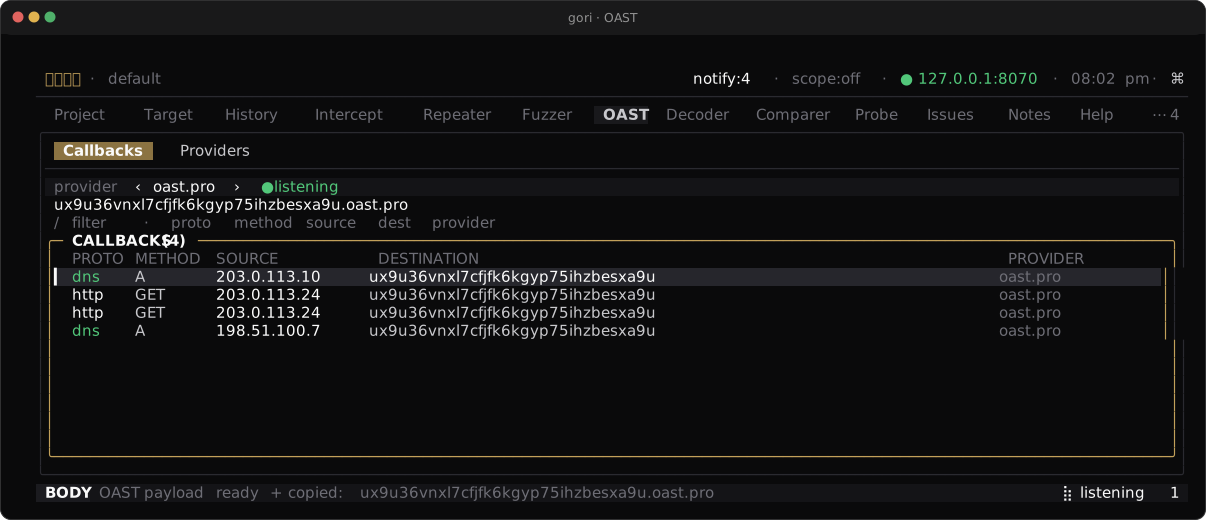
The Loop
- On the OAST tab, press
Ctrl-Rto start listening: gori registers with the selected provider and begins polling. A new project has no provider yet, so add one first on the Providers sub-tab (a; public interactsh is prefilled). - Press
g(get payload) to mint a payload (a unique hostname/URL) and copy it;gstarts the listener itself if one isn't running, andycopies the current one again. Or insert it straight into a request from Repeater / Fuzzer (Space→ Insert OAST payload drops it at the cursor). From History,Space→ Copy OAST payload. - Plant it wherever the target might dereference a URL or resolve a hostname: a URL parameter, a
Host/X-Forwarded-Forheader, an XML entity, a webhook field. - When the target's infrastructure resolves the name or connects back, the callback lands in Callbacks with its protocol (
dns/http/smtp), source IP, timestamp, and the full sub-identifier so you can tell which payload fired.
A callback is proof the target reached a server it shouldn't have. The absence of one is not proof of safety (egress may be filtered), only that this path stayed quiet.
Providers
Each listener is a provider. Add one from the Providers sub-tab (a add, e edit, t enable / disable, d delete); a public preset auto-fills the server host when you pick its type.
The bar above the callbacks table selects which provider g and Ctrl-R act on; ← / → cycle it (the bar draws the pick as ‹ name ›), and All shows every provider's callbacks at once. Getting a payload or starting a listener needs one provider, so on All with two or more providers enabled, g and Ctrl-R open a picker card; pick a row with ↵ and the bar follows. With a single enabled provider there is nothing to ask, and the action just runs.
| Provider | What it is |
|---|---|
interactsh |
Self-hosted or public interactsh servers. Catches encrypted DNS, HTTP, and SMTP callbacks. Public presets: oast.pro, oast.live, oast.site, oast.fun, oast.me. The default type for a new provider and for gori run oast listen / oast_start. |
custom-http |
A plain HTTP endpoint you control and poll for hits. |
webhook.site |
The public webhook.site service (HTTP only). |
BOAST |
A BOAST server (public preset odiss.eu). |
postbin |
A PostBin instance (postb.in). |
With interactsh, gori generates an RSA key pair locally, registers the public key, and decrypts each callback (the private key is stored 0600 in the project database and never logged). The payload id is derived locally from the correlation id, so you can mint many payloads from one registration without another round trip.
Resuming a Listener
The callbacks that matter most arrive late: a stored payload that only fires when someone opens a back-office page, a webhook a nightly job replays, an injection behind a queue. So a listener outlives the session that started it.
Ctrl-X stops polling but keeps the registration, and so does quitting gori or leaving the project. The payloads you already planted keep resolving. Press Shift-R to open RESUME LISTENER, pick a saved session, and gori starts polling it again. Every callback the provider buffered while you were away lands on the next poll, and the session's existing callbacks are still there under it.
| Key | In the picker |
|---|---|
↵ |
Resume polling this session |
x |
Release it: deregister the server-side state for a finished engagement. Its callbacks stay. |
Callbacks are durable per-project history. Resume is a deliberate action, not something gori does on startup: reopening a project does not put you back on a third-party provider without asking.
All three surfaces resume the same sessions. gori run oast list / resume / release and the MCP list_oast_sessions / oast_resume / oast_release act on the rows this picker shows, and a resumed headless listener writes its callbacks into the project, so the tab, a script, and an agent are reading one table. gori run oast listen and MCP oast_start are ad-hoc by default: they register with no project behind them, and those registrations end with the process. --save / persist: true writes the same kind of row, so a headless or agent-driven listener lands in this picker too.
A resumed session polls with the saved provider it was started with, even when several saved providers point at the same server with different tokens. A session saved by an older gori did not record its provider, so gori matches it by the token it registered with. When that still leaves more than one provider, the tab refuses to pick one and does not resume it (it points at gori run oast resume ID), and gori run oast resume and oast_resume poll with the session's own stored token and say so.
No surface resumes on its own. Opening a project, binding an MCP server, or starting a gori run never re-arms a listener; someone asks for it.
Keys
| Key | Action |
|---|---|
Ctrl-R |
Start listening (register with the provider and begin polling) |
Ctrl-X |
Stop polling (the session is kept; resume it with Shift-R) |
Shift-R |
Resume a saved listener |
g |
Get / copy the current payload (asks which provider on All) |
← / → |
Cycle the provider the bar acts on |
y |
Copy the current payload (on the list), or the selected callback (inside its ↵ detail) |
Shift-F |
File the selected callback as an Issue |
/ |
Filter the callback list |
a / e / t / d |
Providers sub-tab: add / edit / enable or disable / delete |
Filing a Callback
A callback is the strongest evidence this tool produces: the target's own infrastructure reached a server it was never given a reason to reach. Shift-F (or Space → Add issue) files the selected callback as an Issue, prefilled with its protocol and source and carrying the raw interaction in as the notes. It opens at HIGH; Tab to the severity row and use ← / → to re-rate it before you commit.
Headless
gori run oast listen is an ad-hoc, store-free listener by default: it registers a payload, prints it to stdout, then streams callbacks until you stop it. Add --save and it becomes a project session instead: its callbacks are written into the project, the registration is kept on exit, and the out-of-band probe rules have something to mint against.
gori run oast presets                          # list the built-in public providers
gori run oast presets --check                  # …and probe each one for reachability
gori run oast listen                           # interactsh, poll until Ctrl-C
gori run oast listen --provider webhook.site   # a different provider
gori run oast listen --once --json             # poll once, emit JSON lines
gori run oast listen --save                    # …and keep it as a project session
When Registration Fails
Registration talks to a third-party server over HTTPS, so it can fail four ways that look identical from the outside: the name does not resolve, the port is filtered, this machine's trust store rejects the certificate, or the provider is down. gori names the stage, because the stage is the remedy:
| Stage | What it means | What to do |
|---|---|---|
dns |
The name never resolved, so nothing was dialed | A restricted or split-horizon resolver. Check whether the other presets resolve |
connect |
TCP connect refused, filtered, or timed out | Egress filtering, or that host is down. Try a sibling preset with --server=URL |
proxy |
Your upstream proxy refused before any provider was contacted | network.upstream_proxy* in settings.json. Another provider takes the same leg |
tls-verify |
The certificate chain was rejected | Either this machine's trust store (see below) or that host's own certificate having expired. --check tells them apart |
tls |
The handshake broke before any certificate was judged | Not a trust problem; a CA bundle cannot help |
timeout |
The port accepted the connection and then said nothing | A silent drop (inline IPS, black-holed egress) |
exchange |
Connected fine, then the transfer broke, or the provider refused | A reset or a silent peer. If the provider answered, read its verdict and check --token |
dial |
The provider URL itself is malformed | Fix --server |
gori run oast presets --check probes every built-in provider at once and prints that stage per preset, which is what separates the cases: one host failing while its four siblings answer is an outage; all of them failing at tls-verify is your CA store.
gori run oast presets --check
[ ok ] interactsh    Public Interactsh (oast.pro)   https://oast.pro    ok         HTTP 200
[fail] interactsh    Public Interactsh (oast.fun)   https://oast.fun    dns        DNS lookup for oast.fun failed — …
It exits non-zero only when nothing answered, so it works as a "can this machine do OAST at all" gate in a script. Pass --project NAME (or --db PATH) to probe the way that project dials (through its pinned upstream proxy and timeouts), which is the only way the answer describes the run it is diagnosing.
Custom CA Bundles
If you run behind a TLS-inspecting proxy, or against a self-hosted interactsh signed by a private CA, tls-verify is what you will see. Point SSL_CERT_FILE at a PEM bundle containing that CA (or SSL_CERT_DIR at a directory of them):
SSL_CERT_FILE=/path/to/corp-ca-bundle.crt gori run oast listen
For gori's own service traffic (OAST providers and the updater) this is additive: the system trust store is still loaded, so a bundle holding only your corporate root does not stop the public presets from working. (Target traffic keeps the usual replace-the-store semantics; see verify_upstream.) There is no --ca-file flag: the environment variable is one setting for every provider, every surface, and the tools you already run beside gori. Nor does --insecure-upstream (or -k) reach an OAST server: it is for a target with a broken certificate, and gori always verifies its own service traffic.
The project's saved sessions (the ones the picker above resumes) are reachable headlessly too:
gori run oast list                             # id, provider, payload host, hits, last poll
gori run oast resume 7                         # re-arm session #7 and stream its callbacks
gori run oast resume 7 --once --json           # one poll, JSON lines, then exit
gori run oast release 7                        # deregister it; its callbacks stay
resume keeps the registration on exit (Ctrl-C stops polling, nothing more) and persists every callback it catches into the project, so the OAST tab shows the same hits. listen --save behaves the same way from its first poll. release is the deliberate teardown for either.
A saved session is also what arms the blind active checks. ssrf_oast, xxe_oast, cmd_injection_oast and rfi_oast plant a payload and wait for the target to call home, so they mint against a stored session; with none they plan nothing and send nothing, and gori run probe --active (and MCP probe_scan, under out_of_band) says so rather than letting an empty result read as "no blind vulnerability".
The saved providers (the Providers sub-tab's rows) are manageable headless too, with gori run oast providers add|update|enable|disable|delete|list, and both listen and resume take --interval SEC (default 5) for the poll cadence.
See the CLI Reference for every flag. Over MCP, an agent drives the same engine with oast_presets / oast_payload / oast_poll / list_oast_sessions (read; oast_payload and oast_poll are still withheld under --read-only) and oast_start / oast_stop / oast_resume / oast_release (action). oast_start is the ad-hoc twin of listen, and takes persist: true for the --save behaviour. oast_resume returns a session_id that oast_poll and oast_payload take, and its polls are persisted like the CLI's; oast_stop on a persisted or resumed session stops polling but keeps it resumable, exactly as Ctrl-X does.
A callback means the target contacted a third-party interaction server, and public interactsh/webhook servers see that callback's metadata. Only run OAST against systems you are authorized to test, and prefer a self-hosted server for sensitive engagements.
Next Steps
- Repeater & Fuzzer: plant payloads and fuzz them across positions
- Scanning & Issues: promote a confirmed callback into an Issue
- MCP Server: let an agent register a payload and poll for hits