








By now you have findings scattered across the Probe tab, a Repeater tab, and your own memory. This playbook gathers them into something you can hand off: an issue with a severity, a diff that proves it, and a report a teammate can read without gori installed. Set aside about ten minutes. Almost nothing here sends new traffic; you work with what you already captured.
Before you begin. You need an engagement with some captured or tested traffic worth writing up. Work through the earlier playbooks first, or bring a project of your own. The examples use
api.example.comas a stand-in.
1. Skim passive findings
Probe runs its passive checks on every flow you capture and every Repeater send. They cost nothing extra (no request leaves your machine to produce them), so this is the cheapest place to start. Open the Probe tab: findings are grouped by check and host, so one row can stand for dozens of hits (permissive CORS, missing security headers, cookie hygiene, secrets in a URL, and the rest).
Open a row and the AFFECTED URLS list is the evidence: ↑/↓ walk it, Enter opens the flow that URL was captured on in the same detail view History uses, and r sends it to the Repeater to dig further.
Read the same set headless, which also sends nothing on its own:
gori run probe                       # passive findings only
gori run probe --severity high       # high and critical (a floor)
gori run probe --category cors       # a single category
Checkpoint. The Probe tab lists findings grouped by severity and category, each one openable to the flow it came from, and History's request count did not move to produce them.
2. File an issue
Issues is the triage list you eventually hand to a report. Press Shift-F on a History flow to file one (from a Repeater tab, Space → Link… → + New issue…); promote a Probe finding into an issue from the Probe tab. Give it a severity (info through critical) and a status (open, confirmed, false-positive, resolved). The flow you filed it from is linked as evidence, so the issue carries its own proof: Enter opens the issue, where the flow is a RELATED row. ↵ on it shows the exchange in place and s opens it in History.
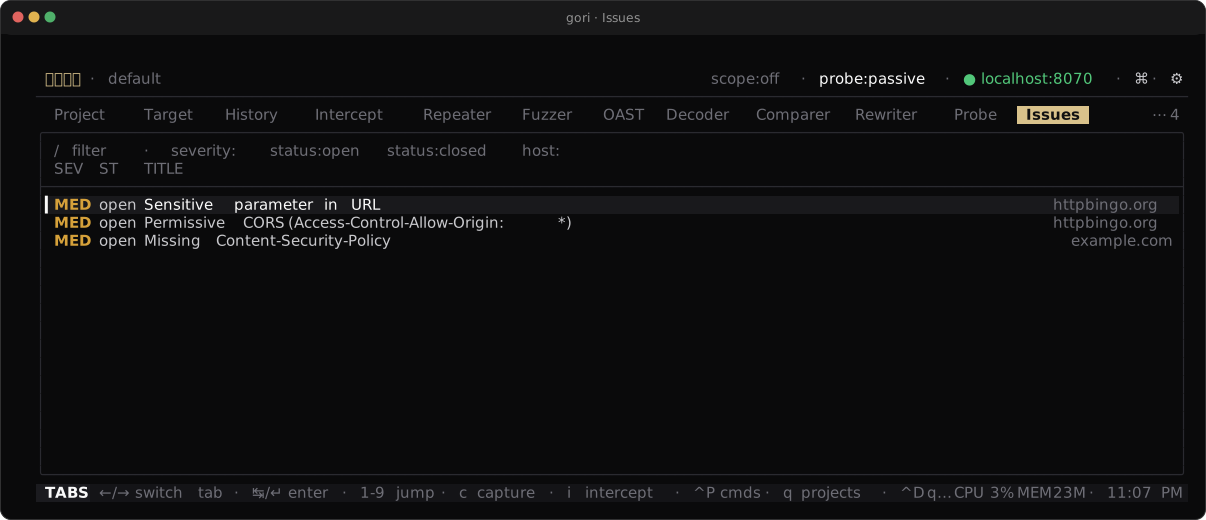
From a script, file and update issues directly; --flow links the evidence in the same move:
gori run issues create --title "IDOR on /v1/users/{id}" --severity high --host api.example.com --flow 42
gori run issues update 7 --status confirmed --notes "Verified on staging"
gori run probe promote 12            # confirm a Probe finding into Issues
Checkpoint. The Issues tab shows your issue with its severity, and opening it lists the evidence flow under RELATED.
3. Prove it with the Comparer
A finding lands harder with the before and after side by side: the unauthenticated 403 next to the authenticated 200, or the patched response next to the vulnerable one. The Comparer holds two messages, A and B, and diffs them.
Fill the slots from wherever a request and its response live. Select the first flow in History and press Space > c (Send flow to… → Send to Comparer); it lands in slot A. Send the second the same way to fill slot B. A Repeater send or a Fuzzer result row goes in the same way, and since neither leaves a captured flow behind, this is their only route into a diff. On the Comparer tab itself, a / b pick a captured flow straight into either slot, through the active Scope lens, so an out-of-scope control needs the lens off.
The divider between the columns states the A→B delta before you read a line: a 403 → 200 is usually the whole answer. ←/→ switches between diffing the requests and the responses, and on a changed row only the bytes that actually differ are lit red and green, so one flipped value stands out without reading the line.
gori run compare 41 42 --pane response --changes-only
Checkpoint. The diff highlights the change that proves the finding: a status flip like 403 → 200, or the one value that moved.
3b. Retest against the last engagement
The Comparer proves one message changed. A retest asks it of the whole surface: what is new, what is gone, and what answers differently since last time? If the previous assessment lives in its own gori project, that is one command.
gori run diff --from q1-audit --to q3-retest --format md
Endpoints are keyed by the same folded template the Sitemap draws (/users/{uuid}), so the identifiers each engagement happened to capture don't turn every row into an added/removed pair, and changed is judged by a tolerance band rather than byte equality, so a page whose length drifts is not a finding. Interactively it is Target → Diff: a picks the baseline, ↵ on a row hands both sides' captures to the Comparer for the byte-level detail.
Read the verdicts exactly. gone means the newer capture asked and got a 404; not seen means it never asked, a gap in this retest's coverage, not a fix. The report closes with each still-open issue and what became of the endpoint it was filed against, without sending anything.
To retest one finding rather than the whole surface, give its issue a retest: the Repeater sessions that reproduce it, in order, each with at most one expected result (status:403, json:data.role=admin, json-absent:data.token, body:same). A json: path reads the same way as --jsonpath (data.user.id, $.items[0].id), and a path it cannot read is refused when you write the step, never stored to pass later. On the issue detail it is ⇧R (Retest…); headless:
gori run retest add --issue 7 --repeater 12 --assert 'json-absent:data.token'
gori run retest run --issue 7
retest run sends through the scope and sandbox gates, records each send in History, and exits 0 only when the verdict is pass.
Checkpoint. --format md gives you a section you can paste straight into the retest deliverable, with both sides' coverage stated above the counts.
4. Keep notes and links
Not everything is an issue. Notes are free-form, per-project Markdown (multiple notes per project): a running log of what you tried, the payload that worked, the lead to return to. Create and edit them on the Notes tab.
To tie the loose evidence together, press Space → Link… from History, the Repeater, the Fuzzer, or the Miner. One card lists every issue and every note, with + New issue… / + New note… pinned above them, so attaching what you are looking at to an existing issue, or filing a fresh one already linked, is the same keystroke. Whatever you type filters by title, host, or status, and becomes the new issue's title if you land on the create row. The cursor opens on + New issue… when nothing has been filed against what you are linking yet (the common first filing), and on the first existing issue once it has links. Landing on an issue also keeps the bytes: the response that confirmed the finding, which the next Repeater send or a retention sweep would otherwise take, is frozen as an immutable copy in the same step, listed as a FROZEN row on the issue's RELATED card and carried into every export with its SHA-256. A note takes the pointer alone, and a ref with no exchange yet (a pending flow, a never-sent tab) is still linked: the card's ↵ token says so before you press it (↵ link — nothing to freeze: …) and the toast repeats it after.
Filing a new issue by hand opens it: the form commits, the Issues detail comes up on the new issue, and the toast ends with the way back: issue #21 created and linked · frozen as evidence #5 · esc returns to History. That esc lands exactly where you were, drill-in and cursor included. (A retest sweep, which files row after row from the Diff, deliberately stays where it is.)
gori run notes create --text "SSRF candidate on /fetch, needs OAST to confirm"
gori run notes --all
Checkpoint. The Notes tab holds your note, and an issue you linked lists the evidence flow or session under it.
5. Export the report
When the issues are triaged, export them as a single Markdown document a teammate can read without gori installed:
gori run issues --format markdown --export report.md
In the TUI the same report is ⇧E on the Issues tab, named in the list's own hint strip: pick the format (↵ export), then the destination path (↵ write, and ↵ overwrite when the file is already there).
When the report is going to a machine rather than a person, export SARIF instead, the format GitHub code scanning, DefectDojo and Azure DevOps ingest:
gori run issues --format sarif --export issues.sarif
gh api -X POST /repos/OWNER/REPO/code-scanning/sarifs \
  -f commit_sha="$(git rev-parse HEAD)" -f ref=refs/heads/main \
  -f sarif="$(gzip -c issues.sarif | base64 | tr -d '\n')"
Each issue arrives as one result carrying its URL, its severity, and, when you linked a flow, the actual request and response as webRequest/webResponse (with Authorization, Cookie, Set-Cookie and API-key header values as [REDACTED] unless you pass --include-sensitive). An issue you triaged to false-positive or resolved exports as a SARIF suppression, so dismissing a finding in gori dismisses it in the dashboard rather than filing it again.
To hand over the raw traffic behind a finding, and not only the write-up, export a History query as one HAR log. It writes to STDOUT, loads into Burp, Charles, or a browser's network panel, and imports straight back into gori:
gori run history -q 'host:api.example.com status:200' --format har > evidence.har
Checkpoint. report.md exists on disk and reads as a severity-ordered list of your issues; evidence.har carries the flows behind them. If you exported SARIF, jq '.runs[0].results | length' issues.sarif matches your issue count.
Next Steps
- Run an AI co-pilot session: put an agent on the same project and keep its consequential actions visible
- Scanning & Issues: the full reference for Probe, Issues, Notes, and the Comparer
- CLI Reference:
run issues,run compare, andrun history --format harin full