








A JWT is only as trustworthy as the server's check of its signature. This playbook takes a token off a captured request, reads its claims, changes one, re-signs it, and fires the classic verification-bypass payloads (alg:none, a weak-secret guess, header injection) to find out which the server accepts. Budget about ten minutes.
Before you begin. Set up a project and scope for a host you're authorized to test (Set up an engagement), and capture a flow that carries a JWT; an
Authorization: Bearer eyJ…header is the usual source. The examples targetapi.example.com.
1. Send a token to the JWT tab
The JWT tab is off the bar by default: press 0 and type "jwt", or Ctrl-P → Go to JWT; give it one of the nine slots in Preferences if you live in tokens. Find the token: open the captured flow in History, select the token text after Bearer in the request detail, and Space S (Send selection to…) → j JWT. That seeds a new JWT sub-tab and decodes the token live into its header, payload, and signature on the Decode lens.
The decode shows what the token claims; it never checks the signature, so a token that decodes cleanly is not necessarily one the server trusts. That is the question the rest of this playbook answers.
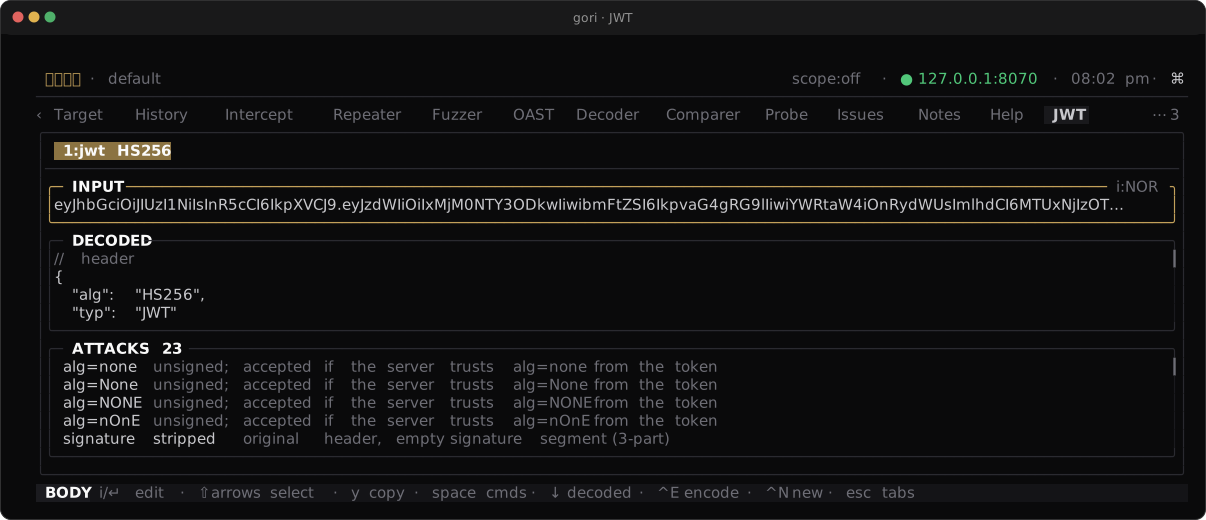
Checkpoint. The JWT tab shows the token's header and payload as JSON, with the signature below.
2. Tamper a claim
Switch to the Encode lens with Ctrl-T, or Space → Load decoded claims to load the decoded token straight into the Encode editors. Edit the PAYLOAD JSON: escalate a role, swap a sub, extend an exp. Pick the algorithm with Ctrl-A (it cycles the HMAC family, then RS/PS/ES at 256/384/512, EdDSA, and none), set a SECRET when you're signing with an HMAC algorithm (or, for an asymmetric one, point the KEY card at a PEM private key), and the re-signed token appears live in OUTPUT. Copy it with y.
The same claim edit runs headless, taking the token from the argument or stdin. --set KEY=VALUE patches one claim (repeatable), or --payload replaces the claims wholesale:
gori run jwt eyJhbGci... --encode --set role=admin --secret s3cret       # escalate one claim
gori run jwt eyJhbGci... --encode --payload '{"sub":"1","admin":true}' --secret s3cret
--set's value is JSON when it parses, so admin=true is a boolean and role=admin a string. Over MCP, jwt_encode takes the same set / payload edits.
If the token is ES256 / RS256 / EdDSA and you hold the signing key, --key takes it (inline PEM or a path), and --verify answers the question the decode cannot:
gori run jwt eyJhbGci... --encode --alg ES256 --key ./private.pem --set role=admin
gori run jwt eyJhbGci... --verify --key ./public.pem                # verified: yes | no (exit 0 | 1)
Checkpoint. OUTPUT holds a token carrying your edited claim, re-signed with the algorithm and secret you chose.
3. Run the attack presets
You rarely know the secret, so let gori generate the bypass attempts instead. On the Decode lens, below the decoded parts, is a selectable list of attack payloads built from the token:
| Attack | What it tests |
|---|---|
| alg:none | Strips the signature and sets alg to none (plus None / NONE case variants). Catches a server that accepts unsigned tokens. |
| Weak secret | Re-signs with a list of common weak HMAC secrets. Catches a guessable signing key. |
| Header injection | Manipulates the kid, jku, x5u, and jwk header parameters. Catches a server that trusts attacker-supplied key material. |
| Algorithm confusion | Needs the server's public key. Downgrades an RS/PS/ES token to HS256, HMAC-keyed with the public key's own bytes. Catches a server that dispatches on the token's alg and reuses its verification key. |
Generate the same set headless:
gori run jwt eyJhbGci... --attacks
gori run jwt eyJhbGci... --attacks --key ./server-public.pem   # ...plus algorithm confusion
The public key is whatever the target publishes: a JWKS x5c certificate works as well as a bare PUBLIC KEY block, and gori reduces either to the SPKI PEM a server would hold.
Over MCP the jwt_attacks tool returns the identical list, taking the same key as public_key (and jwt_decode / jwt_verify / jwt_encode cover steps 1 and 2). All of them are read tools available even under --read-only: they touch no network and write nothing, though a key / public_key given as a path is read from disk.
An encrypted token (five segments rather than three) is a JWE, and none of this applies to it: gori shows its protected header (alg, enc, kid) so you know what you are looking at, and generates no payloads, because there is no claims segment to tamper with and no signature to strip.
Checkpoint. The ATTACKS list is populated with ready-to-send token variants.
4. Replay and confirm
A forged token proves nothing until the server sees it. Pick a payload (your tampered token from step 2, or a preset from step 3), copy it with y, paste it into the Authorization header of the captured request in Repeater, and re-send with Ctrl-R. Read the status against what the endpoint should return for a bad token:
- A
401or403means the server rejected the forgery; it verified the signature. - A
200where you expected a reject means it did not verify; the token was accepted on your terms.
Checkpoint. You can tell an accepted forgery (a success status) from a rejected one (401 / 403), and you know which presets, if any, the server let through.
Next Steps
- Crack and forge session cookies: the same read-tamper-replay loop for signed session cookies
- JWT: the two lenses, re-signing, and every attack in depth
- CLI Reference: every
gori run jwtoption